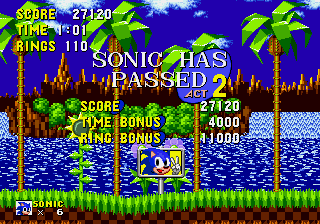
Sonic 1 but different sprites
0 3 1
Sonic 1 but different sprites is a browser-based emulation of a beloved Genesis classic, now with new character visuals that give the game a fresh look while keeping the familiar gameplay. The core mechanics are the same as the original, but the sprites have been replaced with different designs, giving it a unique style without losing the fast-paced, side-scrolling platforming action fans know and love from Sonic.
Step Into the World of Sonic 1 but different sprites
Right from the start, the new sprite designs catch your eye. The backgrounds and character animations stay true to the Genesis look, but every enemy, object, and Sonic himself has a different appearance—more angular, cartoonish, or stylized, depending on the sprite set. The soundtrack sticks to the energetic tunes of the original, keeping the vibe familiar but with a slight refresh. Since it runs straight in your browser, there’s no need to download anything, making it easy to jump in and experience a classic with a new look.
The visual changes don’t take away from what makes the game fun. Instead, they add a new layer of interest, giving players a different perspective on familiar zones. The sound effects, like the ring chimes and bounce pads, match the altered sprites but still bring back that nostalgic feel. Whether you’re a long-time fan or new to Sonic, this version offers a different visual style while keeping the retro soundtrack and atmosphere that made the original special.
How the Gameplay Hooks You
The gameplay focuses on speed, exploration, and quick reactions, just like before. Levels are designed with multiple paths, rewarding both fast traversal and careful exploration. The pacing keeps you engaged, with moments of high momentum balanced by platforming challenges that require precision. It’s simple to pick up but can be tough to master, especially as you learn each level’s layout and enemy patterns.
Moving through zones involves running, jumping, and rolling, collecting rings and avoiding hazards. The sprite changes don’t affect the mechanics, but they make each level look different, giving familiar stages a new feel. The difficulty echoes the classic Sonic challenge, requiring good timing for jumps and enemy avoidance. Short play sessions are satisfying, and the game encourages repeated attempts to improve your speed and score by discovering shortcuts and honing your skills.
Pro Tips for Sonic 1 but different sprites
It might take a moment to get used to the new sprites, so try to focus on the layout of each level rather than just their look.
- Learn enemy patterns early to avoid losing rings and lives.
- Use the Spin Dash well to keep your speed up on straight sections.
- Practice jump timing to land on moving platforms and dodge hazards.
- Look for hidden areas—they often hide extra rings or power-ups.
- Pay attention to background cues that can hint at secret routes or item locations.
- Replaying zones helps you get faster and reduce mistakes in future runs.
Frequently Asked Questions
Can I play Sonic 1 but different sprites for short sessions?
Definitely. Its simple design and familiar levels make it easy to jump in for a quick play.
Does changing the sprites make the game harder or easier?
The mechanics stay the same, so the difficulty doesn’t change much. The visual update is mainly about how it looks, not how it plays.
Is this suitable for new players or just Sonic fans?
With straightforward controls and a classic feel, it works for newcomers as well as fans wanting a new look for a familiar game.
This browser-based version of Sonic 1 but different sprites offers a nostalgic feeling with a fresh visual style. The gameplay stays true to the original, making it a quick and fun way to enjoy Sonic’s adventures with a new artistic touch.
Related games: you can also try Road Rash 3 (USA, Europe) and Magic School Bus, The (USA), or browse all other games in the Genesis category.
How to Play Sonic 1 but different sprites?
Run through levels, jump over obstacles, collect rings, and defeat enemies to reach the end of each zone. Use speed and quick reactions to explore and complete stages efficiently.
Game Controls
Arrow keys control movement; jump and action buttons are mapped to keyboard keys.
You may be interested in:
-
 Genesis
♥ 39
Sonic 1 Hyper Edition
Genesis
♥ 39
Sonic 1 Hyper Edition -
 Genesis
♥ 15
Sonic 1 Hold Right to Win
Genesis
♥ 15
Sonic 1 Hold Right to Win -
 Genesis
♥ 2
Sonic 1 Harder Version v0.6 (Hacking Contest 6 build)
Genesis
♥ 2
Sonic 1 Harder Version v0.6 (Hacking Contest 6 build) -
 Genesis
♥ 1
Sonic 1 Harder Version v0.5 Demo 01
Genesis
♥ 1
Sonic 1 Harder Version v0.5 Demo 01 -
 Genesis
♥ 1
Sonic 1 Harder Version v0.5 (Beta 2)
Genesis
♥ 1
Sonic 1 Harder Version v0.5 (Beta 2) -
 Genesis
♥ 3
Sonic 1 Harder Version v0.4
Genesis
♥ 3
Sonic 1 Harder Version v0.4 -
 Genesis
♥ 2
Sonic 1 Harder Levels v0.7 SHC2013
Genesis
♥ 2
Sonic 1 Harder Levels v0.7 SHC2013 -
 Genesis
♥ 1
Sonic 1 Hard Bosses Hack First Public Release (HackGame) (SHC2014)
Genesis
♥ 1
Sonic 1 Hard Bosses Hack First Public Release (HackGame) (SHC2014)
Comments (0)
No comments yet. Be the first to comment!