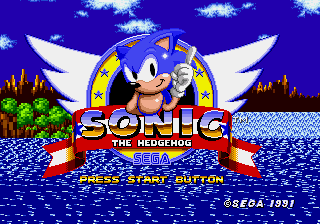
Sonic 1 Hold Right to Win
0 15 7
Sonic 1 Hold Right to Win is a straightforward browser version of the classic Genesis game, made for players who enjoy quick, no-fuss gameplay. This game fits perfectly if you’re after a nostalgic retro feel without complicated mechanics or long levels. If you’re familiar with the Sega Genesis era and want a simple, instantly playable version, it runs right in your browser without needing downloads.
Getting Into Sonic 1 Hold Right to Win
The main gameplay involves speed and simple controls—hold the right arrow key or button, and the game moves forward automatically. There are no level selections or tricky objectives; your goal is to keep moving right without stopping. It ends when you reach the finish or make a mistake, so each run is quick and focused. It’s great for a few minutes of casual play or testing your reflexes.
This version drops obstacles, enemies, or power-ups, focusing on one thing: holding right and going as far as possible. It’s a straightforward test of speed and persistence. You can restart instantly by pressing a key, making it easy to try again and beat your best distance. Without modes or difficulty settings, each attempt is simply about holding right for as long as you can.
Standout Features
The visuals stay true to the original Genesis style, with pixel art that captures the nostalgic charm of early ’90s platformers. The background and sprite design evoke the classic Sonic look, but the game’s simplicity means it’s more about the gameplay than visual details. The goal is clear: keep holding right and go as far as you can, with no levels or bosses to worry about.
Replay value comes from trying to beat your own records for distance or speed. Since the game is easy to jump into, it’s great for short bursts of fun or quick competitions with friends. Its minimalistic design lets you focus solely on the challenge of holding right, making each try a pure speed test.
Strategy and Tips
The main mechanic is holding right, so your best approach is to stay steady and consistent without releasing or hesitating. Staying relaxed helps you go longer.
- Practice keeping the right key pressed smoothly to avoid accidental stops.
- Use quick restarts to try to beat your previous distance or timing.
- Don’t overthink; just focus on instinctively holding right instead of controlling movements or dodging obstacles.
- Experiment with different keyboard or controller setups to find what feels most natural for long holds.
- If your performance dips, take a short break before trying again to reset your focus.
- Watch your habits and see if you tend to release early—aim for smooth, continuous holding to go further.
Quick Questions
How do I get started quickly with Sonic 1 Hold Right to Win?
Just load the game in your browser and press start or any key to begin holding right right away.
What’s the most common mistake for beginners?
Releasing the right key too early or stopping unintentionally shortens your run. Keep a steady, relaxed grip to go farther.
Can I play this game on mobile or touch devices?
This browser version works best with keyboard controls, but some mobile browsers might support touch input if set up. Still, a keyboard or desktop gives the best control.
Sonic 1 Hold Right to Win offers a simple yet addictive challenge rooted in classic gameplay. Its minimal design makes it easy to jump in and try again, focusing on holding right and seeing how far you can go. Whether you’re after a quick distraction or a speed test, this Genesis classic in your browser is a straightforward, nostalgic experience you can enjoy in just a few minutes. Just load it up and hold right to start—that’s all it takes.
Related games: you can also try Ottifants, The (Europe) and James Pond 3 – Operation Starfish (USA, Europe), or browse all other games in the Genesis category.
How to Play Sonic 1 Hold Right to Win?
Hold the right arrow key to keep moving forward as far as possible without stopping. The game ends when you reach the finish or make a mistake, and you can restart instantly to beat your previous distance.
Game Controls
Arrow keys act as the D-pad; Enter is Start; on-screen mapped keys handle the action buttons
You may be interested in:
-
 Genesis
♥ 4
Sonic 1 Jammed
Genesis
♥ 4
Sonic 1 Jammed -
 Genesis
♥ 8
Sonic 1 in Sonic 3 (S.C.E. Version)
Genesis
♥ 8
Sonic 1 in Sonic 3 (S.C.E. Version) -
 Genesis
♥ 39
Sonic 1 Hyper Edition
Genesis
♥ 39
Sonic 1 Hyper Edition -
 Genesis
♥ 2
Sonic 1 Harder Version v0.6 (Hacking Contest 6 build)
Genesis
♥ 2
Sonic 1 Harder Version v0.6 (Hacking Contest 6 build) -
 Genesis
♥ 1
Sonic 1 Harder Version v0.5 Demo 01
Genesis
♥ 1
Sonic 1 Harder Version v0.5 Demo 01 -
 Genesis
♥ 1
Sonic 1 Harder Version v0.5 (Beta 2)
Genesis
♥ 1
Sonic 1 Harder Version v0.5 (Beta 2) -
 Genesis
♥ 3
Sonic 1 Harder Version v0.4
Genesis
♥ 3
Sonic 1 Harder Version v0.4 -
 Genesis
♥ 2
Sonic 1 Harder Levels v0.7 SHC2013
Genesis
♥ 2
Sonic 1 Harder Levels v0.7 SHC2013
Comments (0)
No comments yet. Be the first to comment!