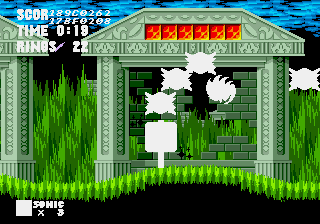
Sonic 1: Black and White Edition V2.5
0 4 0
Getting Into Sonic 1: Black and White Edition V2.5
Sonic 1: Black and White Edition V2.5 is a classic Genesis game recreated here for instant play in your browser. If you enjoyed the original Sega Genesis platformer, this version offers a familiar yet different experience with its monochrome aesthetic. It’s a simple, fast-paced adventure that appeals to fans of retro platformers and those curious to see how Sonic’s early days looked in a minimalist style.
The game keeps the core gameplay of the original: speed, jumping, and avoiding obstacles. You control Sonic through a series of side-scrolling levels filled with loops, ramps, and enemies. Sessions usually involve racing through stages to reach the end before time runs out, collecting rings along the way for safety and score boosts. The design encourages quick reflexes and memorizing level layouts, making repeated plays rewarding as you improve your time and score.
Standout Features
This version’s visual style drops the usual color palette, leaving a stark black-and-white presentation that emphasizes level shape and Sonic’s motion. While the monochrome look might seem minimalist, it highlights the game’s level design and speed runs, giving it a unique feel that sets it apart from other versions. It’s a fresh take that might attract players who enjoy a different visual approach while still experiencing classic gameplay.
Progression in the game is straightforward: complete each stage to unlock the next, with no complex branching paths or unlockables. The replay value comes from trying to beat your best times and scores, and mastering tricky sections of the levels. Because it’s based on a well-known platformer, players often return to improve their run or just enjoy the swift, arcade-style gameplay. Its simplicity makes it accessible but also offers enough challenge to keep even experienced players interested.
Strategy and Tips
When you start, focus on keeping Sonic’s momentum going—hesitation often leads to mistakes or falling behind. Collect rings whenever possible, as they protect you from losing a life if hit by an enemy or obstacle. Practice tricky sections to memorize level layouts and boost your speed. Use the environment, like loops and ramps, to keep Sonic moving quickly without losing control. Aim to finish levels fast rather than taking unnecessary detours for extra rings or points. If you get stuck, try to find safer routes through difficult areas instead of rushing blindly. Patience and precision often beat reckless speed here.
- Keep Sonic moving—stopping reduces your chances of hitting hazards and losing momentum.
- Learn where rings and hazards are in each stage to plan safer routes.
- Practice tricky sections over and over to improve your timing and reactions.
- Use ramps and loops to gain speed but stay aware of control and landing accuracy.
- If you lose rings, stay calm and focus on regaining control quickly to avoid losing a life.
Quick Questions
How do I get started with the game?
Just load it in your browser—no downloads needed—and start moving Sonic through the levels to get a feel for the controls and layout.
What’s the most common mistake for beginners?
Many players hesitate or slow down too much, losing momentum and time. Staying aggressive and keeping your speed up helps a lot.
Can I play Sonic 1: Black and White Edition V2.5 on mobile or touch devices?
Yes, since it runs directly in your browser, you can play it on mobile devices with touch screens, though controls might feel different depending on your device.
Sonic 1: Black and White Edition V2.5 offers a simple, nostalgic platforming challenge with a distinctive monochrome style. It’s a good pick if you want a quick, skill-based experience rooted in classic Sega Genesis gameplay, all playable for free right in your browser.
Related games: you can also try Fun Car Rally (USA) (Proto) and Indiana Jones and the Last Crusade (USA), or browse all other games in the Genesis category.
How to Play Sonic 1: Black and White Edition V2.5?
Guide Sonic through monochrome levels by running, jumping, and avoiding obstacles to reach the end before time runs out, collecting rings to protect yourself and improve your score.
Game Controls
Arrow keys control Sonic's movement; space or designated keys handle jumping and actions.
You may be interested in:
-
 Genesis
♥ 4
Sonic 2 Beta Hoax
Genesis
♥ 4
Sonic 2 Beta Hoax -
 Genesis
♥ 7
Sonic 2 Ashura
Genesis
♥ 7
Sonic 2 Ashura -
 Genesis
♥ 2
Sonic 2 Armageddon Game
Genesis
♥ 2
Sonic 2 Armageddon Game -
 Genesis
♥ 5
Sonic 2 Aluminium Edition Version 3.1
Genesis
♥ 5
Sonic 2 Aluminium Edition Version 3.1 -
 Genesis
♥ 5
Sonic 2 Alternate Sequel (Amy Rose)
Genesis
♥ 5
Sonic 2 Alternate Sequel (Amy Rose) -
 Genesis
♥ 45
Sonic 2 Adventure Edition
Genesis
♥ 45
Sonic 2 Adventure Edition -
 Genesis
♥ 16
Sonic 2 Adventure Control
Genesis
♥ 16
Sonic 2 Adventure Control -
 Genesis
♥ 32
Sonic 2 Advanced Edit Release 4
Genesis
♥ 32
Sonic 2 Advanced Edit Release 4
Comments (0)
No comments yet. Be the first to comment!