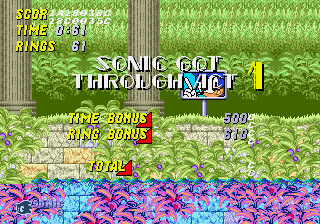
Sonic 2 Aluminium Edition Version 3.1
0 5 0
Step Into the World of Sonic 2 Aluminium Edition Version 3.1
Sonic 2 Aluminium Edition Version 3.1 takes players back to the lively, pixelated universe of the Sega Genesis era. On this browser-based version, you can enjoy the legendary speedster’s adventure without needing a console—just open your browser and jump right in. The look is a bit different, with metallic and futuristic touches, but the core gameplay remains true to the original, full of high-energy platforming that defined the early ’90s. You’ll feel the rush as you race through colorful levels packed with loops, spikes, and enemies.
The visuals feature sharp sprites and vibrant backgrounds that nod to the classic Genesis palette, with modern touches that make the scrolling and animations smooth. The soundtrack keeps the nostalgic chiptune melodies alive, matching the quick movement and adding to the overall vibe. Moving through tunnels, open plains, and mechanical corridors, the game balances retro charm with a sleek presentation. Playing in your browser makes it quick and easy to jump into this timeless adventure, whether for a quick session or a longer challenge.
How the Gameplay Hooks You
The main idea involves running, jumping, and collecting rings as you speed through each level. The pace is intense, forcing you to balance moving forward quickly with making precise jumps and avoiding hazards. Each level offers new layouts, enemies, and obstacles, keeping things interesting without becoming overwhelming. As you go, the difficulty ramps up a bit, encouraging you to master Sonic’s movement and quick decision-making.
Controls are smooth, and the level design keeps you engaged. Short levels mean you can get in a quick play or spend more time trying to beat your best scores. Each run feels lively, with moments of tension and excitement that make replaying levels rewarding. Sonic 2 Aluminium Edition Version 3.1 offers a familiar feel with fresh touches, where quick reflexes and smart movement are key to progressing.
Pro Tips for Sonic 2 Aluminium Edition Version 3.1
If you want to get better at the game, here are some tips:
- Keep a steady speed to build momentum—slowing down makes jumps and avoiding obstacles harder.
- Use rings wisely; collecting enough can save you from losing a life if you get hit.
- Learn each level’s layout to anticipate hazards and find faster routes.
- Practice timing your jumps to land on moving platforms or dodge spikes more easily.
- Explore secrets and alternate paths to boost your score and find power-ups.
- Take your time when needed—sometimes a cautious approach helps you survive tricky sections.
Frequently Asked Questions
Is Sonic 2 Aluminium Edition Version 3.1 good for quick play sessions?
Absolutely. The level design and pacing make it easy to jump in for a few minutes, with quick reloads and immediate gameplay that keep you engaged.
Does it get repetitive after a while?
Not really. While the core gameplay is running and jumping, the variety of levels and increasing difficulty help keep things fresh each time you play.
Will it run smoothly on most devices?
The in-browser emulation is optimized for modern browsers, so it should perform well on most computers and tablets, though older hardware might experience some lag.
Sonic 2 Aluminium Edition Version 3.1 captures the spirit of a Genesis classic while offering a smooth, browser-based experience. Its straightforward gameplay makes it a fun choice for fans of high-speed platforming or anyone looking for a quick, engaging game that runs right in your browser.
Related games: you can also try Cotton Candy in Sonic the Hedgehog 2 and Eternal Champions (USA), or browse all other games in the Genesis category.
How to Play Sonic 2 Aluminium Edition Version 3.1?
Run through levels, jump over obstacles, and collect rings to complete each stage as quickly as possible. Avoid hazards and learn level layouts to improve your score and progress.
Game Controls
Arrow keys act as the D-pad; space or designated keys handle jumping and actions.
You may be interested in:
-
 Genesis
♥ 4
Sonic 2 Beta Hoax
Genesis
♥ 4
Sonic 2 Beta Hoax -
 Genesis
♥ 7
Sonic 2 Ashura
Genesis
♥ 7
Sonic 2 Ashura -
 Genesis
♥ 2
Sonic 2 Armageddon Game
Genesis
♥ 2
Sonic 2 Armageddon Game -
 Genesis
♥ 5
Sonic 2 Alternate Sequel (Amy Rose)
Genesis
♥ 5
Sonic 2 Alternate Sequel (Amy Rose) -
 Genesis
♥ 45
Sonic 2 Adventure Edition
Genesis
♥ 45
Sonic 2 Adventure Edition -
 Genesis
♥ 16
Sonic 2 Adventure Control
Genesis
♥ 16
Sonic 2 Adventure Control -
 Genesis
♥ 32
Sonic 2 Advanced Edit Release 4
Genesis
♥ 32
Sonic 2 Advanced Edit Release 4 -
 Genesis
♥ 2
Sonic 2 Advanced Edit Release 3 beta
Genesis
♥ 2
Sonic 2 Advanced Edit Release 3 beta
Comments (0)
No comments yet. Be the first to comment!