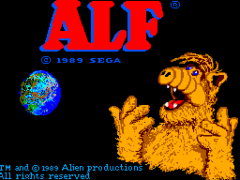
Alf (USA)
0 11 1
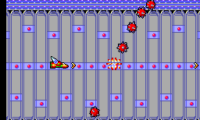
Alf (USA) is a classic Master System game that captures the charm of its retro platform, offering a straightforward and accessible experience for players who enjoy casual action. Perfect for fans of light-hearted arcade games, it features simple mechanics and a nostalgic feel that appeals to those wanting a quick dose of fun on their browser. Whether you’re a seasoned veteran or new to the Master System library, this game provides a pleasant challenge wrapped in colorful pixel art.
Getting Into Alf
The game involves guiding Alf through a series of levels filled with obstacles and enemies. The main idea is to navigate platforms, avoid hazards, and collect items to move forward. Players control Alf as he moves through each stage, jumping over pits, dodging enemies, and grabbing collectibles scattered throughout the environment. The levels are short but have enough variety to keep things interesting.
Sessions usually start with a clear goal—reach the end of the level or beat a certain score. As you play, the difficulty gradually increases, with more enemies or faster hazards. The game rewards quick reflexes and precise timing, making each run satisfying and fun. Since it’s designed for quick play sessions, it’s great for players who want to enjoy a few levels without a big time commitment.
Standout Features
Visually, Alf uses colorful pixel art that captures the playful spirit of the era, with well-animated characters and lively backgrounds. The visuals are simple but charming, adding to the game’s inviting atmosphere. The sound design includes cheerful tunes and sound effects that heighten the sense of progression and excitement during play.
Progression is straightforward: complete each level to unlock the next, and high scores are kept to encourage replaying. The game’s design allows for quick retries, making it easy to improve your run or try different strategies. Its replay value comes from mastering levels faster or beating your previous scores, rather than branching paths or multiple modes. This simplicity makes Alf suitable for short bursts of fun or casual gaming sessions.
Strategy and Tips
At the start, focus on timing your jumps carefully to avoid enemies and pitfalls. Collect power-ups and items whenever you can to make progress easier. Watch enemy patterns—they often follow predictable routes once you observe them. Use brief pauses between jumps to better plan your path and avoid rushing into danger. Patience often beats speed in tricky sections. Practice helps improve your timing during complex sequences. Don’t forget to explore each level thoroughly—sometimes hidden items are worth the extra effort.
Quick Questions
What’s the best way for a beginner to get started?
Begin with the first few levels to get familiar with enemy patterns and platforming. Take your time and don’t rush until you’re comfortable with the controls.
What is the most common mistake players make when starting out?
Many try to rush through levels without watching enemy movements, which can lead to unnecessary losses. Patience and observation help things go smoother.
Can I play Alf comfortably on mobile or touch devices?
Yes, since it runs directly in your browser, you can play on mobile devices with a responsive interface. Just keep in mind that precise timing might take some getting used to on touch screens.
Alf offers a colorful, light experience that’s easy to pick up and enjoy. Its straightforward gameplay and charming visuals make it a good choice for casual gaming on your browser, giving a nostalgic yet accessible adventure in the style of the Master System.
Related games: you can also try Aerial Assault (USA) and Alex Kidd no Miracle World (Japan), or browse all other games in the Master System category.
How to Play Alf (USA)?
Guide Alf through levels by jumping over obstacles, avoiding enemies, and collecting items to reach the end. Complete each stage to unlock the next and improve your high score.
Game Controls
Arrow keys control movement; a dedicated button is used for jumping and actions.
You may be interested in:
-
 Master System
♥ 3
Baku Baku Animal (Brazil)
Master System
♥ 3
Baku Baku Animal (Brazil) -
 Master System
♥ 3
Back to the Future Part III (Europe)
Master System
♥ 3
Back to the Future Part III (Europe) -
 Master System
♥ 1
Back to the Future Part II (Europe)
Master System
♥ 1
Back to the Future Part II (Europe) -
 Master System
♥ 6
Aztec Adventure – The Golden Road to Paradise (World)
Master System
♥ 6
Aztec Adventure – The Golden Road to Paradise (World) -
 Master System
♥ 4
Ayrton Senna’s Super Monaco GP II (Europe)
Master System
♥ 4
Ayrton Senna’s Super Monaco GP II (Europe) -
 Master System
♥ 1
Astro Warrior & Pit Pot (Europe)
Master System
♥ 1
Astro Warrior & Pit Pot (Europe) -
 Master System
♥ 5
Astro Warrior (Japan, USA)
Master System
♥ 5
Astro Warrior (Japan, USA) -
 Master System
♥ 1
Astro Flash (Japan)
Master System
♥ 1
Astro Flash (Japan)
Comments (0)
No comments yet. Be the first to comment!