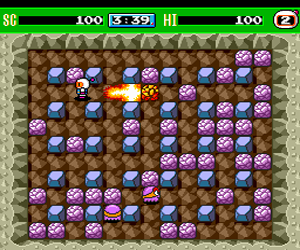
Bomberman ’93 (USA)
0 18 2
Bomberman ’93 (USA) is a classic TurboGrafx-16 game that captures the frantic, explosive fun of one of gaming’s most enduring multiplayer franchises. Its pixel art and chiptune soundtrack evoke the late 80s and early 90s arcade scene, blending action, strategy, and puzzle gameplay that works well for quick sessions or longer battles. This TurboGrafx-16 game runs right in your browser, so you can enjoy the chaos without any fuss.
Step Into the World of Bomberman ’93
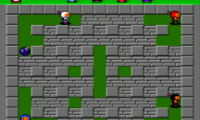
Visually, Bomberman ’93 shows a colorful grid-based arena filled with simple, yet expressive sprites. Bright backgrounds and animated explosions add to the scene, making it easy to read at a glance. The sound design features catchy tunes and satisfying explosion effects—nothing overly complicated, but enough to keep the energy high. The vibe is cheerful chaos, where players navigate a maze of blocks and enemies with quick reflexes.
As a game originally made for the TurboGrafx-16, it keeps the console’s iconic style and sound palette, translated smoothly for browser play. The gameplay is fast, requiring quick thinking and strategic bomb placement. Whether you’re playing alone or with friends, the simple visuals and intuitive controls make it accessible while offering enough depth for experienced players. It’s a universe of exploding blocks and clever traps, wrapped in a nostalgic package that captures early 90s arcade action perfectly.
How the Gameplay Hooks You
Bomberman ’93 is about laying bombs to clear paths, defeat enemies, and trap opponents. The main idea is simple: place a bomb, then dodge the explosion and wait for it to go off. Success depends on timing and smart placement, especially against opponents or AI enemies. The game moves quickly, encouraging swift decisions and rewarding clever trap setting or surprise attacks.
Progress comes from mastering levels with more enemies, obstacles, and tighter spaces. The multiplayer mode, where you face off against friends or AI, really shines. It turns each match into a frantic puzzle of escaping explosions and outsmarting rivals. Even short sessions deliver moments of tension, achievement, and the satisfaction of learning the maps and sharpening your tactics.
Pro Tips for Bomberman ’93
To get the most out of Bomberman ’93, consider these tips:
- Use walls and obstacles to block opponents’ bombs and create safe zones.
- Place bombs to trap enemies rather than just clear blocks—think ahead.
- Keep moving to avoid getting caught in your own explosions.
- Watch enemy patterns—predict their moves to set better traps.
- In multiplayer, lure opponents into chasing you into your bombs for easy eliminations.
- Practice quick escapes—knowing when to run or hide can save you in tight spots.
Frequently Asked Questions
Will Bomberman ’93 get repetitive after a while?
The game’s pacing and multiplayer modes keep things fresh, especially with different opponents or AI difficulty. Its core mechanics are simple, but timing and trap placement keep it engaging over time.
Is it suitable for short gaming breaks?
Definitely. Matches tend to be quick, often just a few minutes, making it easy to jump in, play a round, and move on without losing momentum.
Can I enjoy this game offline or on any device?
Since it runs directly in your browser, it works on most devices with internet access. No downloads needed, and it’s designed for quick, accessible play whether at home or on the go.
Bomberman ’93 offers a straightforward yet challenging experience that’s easy to pick up but hard to master. Its mix of action, strategy, and puzzles makes it a timeless choice for fans of competitive and casual gaming alike. Playing it here, free in your browser, means you can enjoy its explosive charm whenever the mood hits.
Related games: you can also try Artist Tool (Japan) and Ballistix (USA), or browse all other games in the TurboGrafx-16 category.
How to Play Bomberman ’93 (USA)?
Place bombs to break blocks, defeat enemies, and trap opponents. Move quickly, time your explosions, and outsmart rivals in fast-paced maze battles.
Game Controls
Arrow keys control movement; other keys handle actions like placing bombs and starting the game.
You may be interested in:
-
 TurboGrafx-16
♥ 1
Bouken Danshaku Don – The Lost Sunheart (Japan)
TurboGrafx-16
♥ 1
Bouken Danshaku Don – The Lost Sunheart (Japan) -
 TurboGrafx-16
♥ 6
Bonk’s Revenge (USA)
TurboGrafx-16
♥ 6
Bonk’s Revenge (USA) -
 TurboGrafx-16
♥ 8
Bonk’s Adventure (USA)
TurboGrafx-16
♥ 8
Bonk’s Adventure (USA) -
 TurboGrafx-16
♥ 10
Bonk III – Bonk’s Big Adventure (USA)
TurboGrafx-16
♥ 10
Bonk III – Bonk’s Big Adventure (USA) -
 TurboGrafx-16
♥ 38
Bomberman (USA)
TurboGrafx-16
♥ 38
Bomberman (USA) -
 TurboGrafx-16
♥ 5
Bomberman (Japan)
TurboGrafx-16
♥ 5
Bomberman (Japan) -
 TurboGrafx-16
♥ 36
Bomberman ’94 (Japan)
TurboGrafx-16
♥ 36
Bomberman ’94 (Japan) -
 TurboGrafx-16
♥ 5
Bomberman ’93 (Japan) (Special Version)
TurboGrafx-16
♥ 5
Bomberman ’93 (Japan) (Special Version)
Comments (0)
No comments yet. Be the first to comment!