Boarder Zone (USA)
0 1 0
Introduction
Boarder Zone (USA) is a classic Game Boy Color game that takes players to a chilly, snow-covered landscape where snowboarding is both an art and a challenge. Its pixelated graphics and chiptune soundtrack remind us of the late 1990s handheld gaming era, offering a simple yet addictive winter sports experience. This game invites you to carve down icy slopes, perform tricks, and race against the clock, all within the colorful, compact world of the Game Boy Color.
This title captures the essence of early portable gaming—focused gameplay wrapped in a winter-themed package. It’s perfect for quick gaming sessions or short bursts of fun, whether you’re experienced with retro games or just starting out. Playing it in your browser using this emulator makes it easy to enjoy the snowboarding action without any complicated setup, just a few clicks away from pixelated mountain trails.
Step Into the World of Boarder Zone
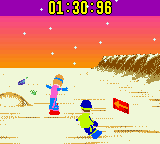
The visuals in Boarder Zone feature crisp, pixel-perfect sprites, with snow-covered mountains and icy slopes stretching across the screen. The scenery is straightforward but effective, capturing the brisk, cold feeling of winter sports. Bright colors highlight the snow and sky, creating a cheerful yet chilly look. The sound design complements this environment with lively chip music and sound effects that mimic rushing snow and the swoosh of a snowboard carving through ice.
The game’s atmosphere is energetic, encouraging players to keep moving and stay alert. The limited graphical detail emphasizes speed and precision, pushing you to focus on timing and positioning. Even with its simplicity, the music and sound effects evoke a sense of speed and adrenaline, making each run feel like a quick rush down an icy mountain trail. Playing on the browser offers an authentic experience that preserves the nostalgic charm of the Game Boy Color era.
How the Gameplay Hooks You
Boarder Zone’s gameplay centers on racing down snowy slopes, avoiding obstacles, and performing tricks to earn points. Its straightforward controls—pressing buttons to accelerate, brake, and jump—create an accessible yet challenging loop. The pace is quick, requiring fast reflexes and good timing to get the best score on each run. As you progress, the slopes get tougher, keeping the gameplay interesting without overwhelming newcomers.
The challenge increases as you learn each course, with difficulty gradually rising. Short, replayable sessions make it great for quick gaming breaks. The excitement of beating your high score or completing a run without crashing keeps players coming back, and the simple controls mean you can jump right in and enjoy the thrill of sliding down icy trails almost immediately.
Pro Tips for Boarder Zone
If you’re looking to improve your runs, keep these tips in mind:
- Timing your jumps well helps avoid obstacles and land smoothly for more tricks and points.
- Getting familiar with each slope’s layout can help you anticipate turns and tricky sections.
- Keep a steady speed; rushing might lead to crashes, while cautious control helps you stay on track.
- Practice each course multiple times to memorize patterns and find the best route for higher scores.
- Use tricks strategically—timing your jumps to maximize points without risking crashes.
- Take short breaks between runs to reset your reflexes and avoid fatigue, especially on tougher slopes.
Frequently Asked Questions
Does Boarder Zone get repetitive after a while?
The core gameplay—racing and performing tricks—offers enough variety for quick sessions, but it can start to feel repetitive if played extensively. It’s best enjoyed in short bursts or as a nostalgic throwback.
Can I play Boarder Zone offline or only on this browser emulator?
This version runs directly in your browser, so no downloads or installations are needed. It’s a convenient way to enjoy the game anytime, anywhere, with no internet after loading.
Is this game suitable for players of all ages?
Yes, the simple controls and winter sports theme make it suitable for most age groups, especially those who like quick, skill-based challenges.
How long does a typical run last?
Most runs take about a minute or two, making it perfect for quick gaming sessions or testing your skills on different slopes without a big time commitment.
Closure
Boarder Zone stands out as a charming example of Game Boy Color snowboarding games, offering straightforward fun with a nostalgic touch. Its focus on quick, skillful gameplay makes it ideal for casual play in your browser, capturing the spirit of classic handheld snow sports. Whether you’re racing against the clock or aiming for a new high score, this game invites you to carve through icy landscapes with a sense of excitement.
Related games: you can also try Barbie – Pet Rescue (USA) and Army Men – Air Combat (USA) (En,Fr,De), or browse all other games in the Game Boy Color category.
How to Play Boarder Zone (USA)?
Race down snowy slopes, avoid obstacles, and perform tricks to earn points. Use quick reactions to control your snowboard and aim for the best score on each run.
Game Controls
Arrow keys act as the D-pad; Enter is Start; other keys handle actions.
You may be interested in:
-
 Game Boy Color
♥ 43
Zook Hero Z
Game Boy Color
♥ 43
Zook Hero Z -
 Game Boy Color
♥ 1
Zok Zok Heroes (Japan)
Game Boy Color
♥ 1
Zok Zok Heroes (Japan) -
 Game Boy Color
♥ 1
Zoids – Shirogane no Juukishin Liger Zero (Japan)
Game Boy Color
♥ 1
Zoids – Shirogane no Juukishin Liger Zero (Japan) -
 Game Boy Color
♥ 1
Zoids – Jashin Fukkatsu! Genobreaker Hen (Japan)
Game Boy Color
♥ 1
Zoids – Jashin Fukkatsu! Genobreaker Hen (Japan) -
 Game Boy Color
♥ 2
Zoboomafoo – Playtime in Zobooland (USA)
Game Boy Color
♥ 2
Zoboomafoo – Playtime in Zobooland (USA) -
 Game Boy Color
♥ 1
Zidane Football Generation (Europe) (En,Fr,De,Es,It)
Game Boy Color
♥ 1
Zidane Football Generation (Europe) (En,Fr,De,Es,It) -
 Game Boy Color
♥ 1
Zen-Nihon Shounen Soccer Taikai – Mezase Nihon Ichi! (Japan)
Game Boy Color
♥ 1
Zen-Nihon Shounen Soccer Taikai – Mezase Nihon Ichi! (Japan) -
 Game Boy Color
♥ 1
Zebco Fishing! (USA)
Game Boy Color
♥ 1
Zebco Fishing! (USA)
Comments (0)
No comments yet. Be the first to comment!