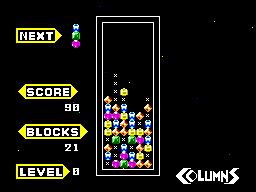
Columns (USA, Europe)
0 5 0
Columns (USA, Europe) is a classic Master System game that’s really easy to pick up and enjoy, making it great for quick gaming sessions or casual puzzle fun. As a game from the early 8-bit days, it’s simple to understand but still offers enough challenge to keep you interested. Playing it in your browser means you can jump right into this nostalgic puzzle experience without downloads or setup, right here on this site.
What Is Columns?
Columns is a puzzle game that fits into the strategy and matching genres. Its main mechanic involves lining up falling tiles of different colors in a vertical grid to make lines of three or more of the same color. When you manage to match three or more, those tiles disappear, and new ones keep dropping, making the game feel continuous. The aim is to clear as many tiles as possible before the grid fills up.
The game calls for quick thinking and pattern recognition. It’s easy for newcomers to get the hang of, but perfecting the timing and placement to score high takes practice. The gameplay moves quickly, with tiles falling steadily, so staying focused and planning your moves carefully helps you avoid losing when the grid gets crowded.
What Keeps You Coming Back
What makes Columns so engaging is how simple yet addictive the gameplay is. The satisfaction of lining up three or more of the same color gives an immediate sense of accomplishment, pushing you to improve your speed and strategy. Its minimal design and straightforward controls make it accessible for players of all ages, encouraging repeated tries to beat high scores or last longer.
Playing again reveals more layers of challenge. As you improve, you start to see upcoming tiles and manage the falling pieces more efficiently. Since there’s no real end to the game, it’s all about beating your best score or surviving as long as possible. That competitive streak and quick gameplay cycle keep it interesting over time.
Handy Tips
Getting better at Columns can be straightforward with a few simple strategies. Here are some ideas to help improve your game:
- Try to create vertical matches, which clear more tiles quickly and help keep the grid from filling up.
- Set up multiple possible matches at once by planning your placements ahead of time.
- Pay attention to the upcoming tiles so you can plan your moves, especially when a tricky piece is about to drop.
- Use the side columns to hold tiles temporarily if you’re trying to set up a longer combo.
- Don’t rush your placements; sometimes waiting just a moment can help you align a bigger match.
- If the game feels overwhelming, take a brief pause to reassess your strategy before continuing.
Player FAQ
Is Columns easy for a beginner?
Yes, it’s simple to pick up, with mechanics that are accessible to players of all ages. It’s designed to be easy to learn, though mastering it can take some practice, especially in longer sessions.
Can children enjoy Columns?
Definitely. Its colorful visuals and straightforward gameplay make it suitable for younger players, and it doesn’t require an internet connection or complicated controls.
Is Columns playable offline or in the browser?
This version runs right in your browser, so you can enjoy it anytime without needing an internet connection. It’s a quick way to experience a classic Master System puzzle game instantly.
Playing Columns in your browser provides a quick, easy dose of puzzle fun rooted in the Master System era. Its simple mechanics and replay value make it a timeless choice for puzzle fans looking for a quick challenge or a nostalgic trip.
Related games: you can also try Chapolim x Dracula – Um Duelo Assustador (Brazil) and American Baseball (Europe), or browse all other games in the Master System category.
How to Play Columns (USA, Europe)?
Drop and match falling tiles of the same color in a vertical grid to clear lines of three or more, aiming for high scores before the grid fills up.
Game Controls
Arrow keys move and rotate tiles; space or enter to drop faster.
You may be interested in:
-
 Master System
♥ 6
Zool – Ninja of the ‘Nth’ Dimension (Europe)
Master System
♥ 6
Zool – Ninja of the ‘Nth’ Dimension (Europe) -
 Master System
♥ 2
Zillion II – The Tri Formation (World)
Master System
♥ 2
Zillion II – The Tri Formation (World) -
 Master System
♥ 3
Zillion (USA) (v1.1)
Master System
♥ 3
Zillion (USA) (v1.1) -
 Master System
♥ 1
Zillion (Japan, Europe) (En,Ja)
Master System
♥ 1
Zillion (Japan, Europe) (En,Ja) -
 Master System
♥ 1
Zillion (Europe) (v1.2)
Master System
♥ 1
Zillion (Europe) (v1.2) -
 Master System
♥ 1
Zaxxon 3-D (World) (Beta)
Master System
♥ 1
Zaxxon 3-D (World) (Beta) -
 Master System
♥ 1
Zaxxon 3-D (World)
Master System
♥ 1
Zaxxon 3-D (World) -
 Master System
♥ 1
Xenon 2 – Megablast (Europe) (Virgin)
Master System
♥ 1
Xenon 2 – Megablast (Europe) (Virgin)
Comments (0)
No comments yet. Be the first to comment!