Darkwing Duck 2 (U) Beta
0 4 2
Darkwing Duck 2 (U) Beta is a classic NES game you can play right in your browser, giving a nostalgic look at platformer adventures from the late 80s. It captures the spirit of the NES with pixel-perfect visuals and a chiptune soundtrack, putting players in the shoes of Darkwing Duck as he fights crime. The controls are simple and familiar, making it easy for newcomers to pick up, while the difficulty keeps seasoned fans on their toes.
Step Into the World of Darkwing Duck 2 (U) Beta
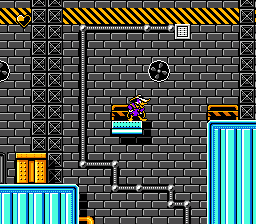
The game takes you to a city inspired by comic books, filled with villains that Darkwing Duck needs to outsmart. The levels are colorful, side-scrolling, and packed with hazards and enemies. Bright sprites and straightforward backgrounds evoke that classic late 80s NES style. The music is energetic, with punchy sound effects that fit the comic book hero vibe. While not overly complicated, the look and feel match the playful, exaggerated tone of the Darkwing Duck cartoon series.
Playing in your browser means instant access to this vintage-style action. The pace moves quickly, with each level combining platforming and enemy encounters. The gameplay emphasizes quick reflexes and smart movement, so every jump and attack matters. The sound design adds a sense of urgency, keeping you engaged as you chase villains or dodge obstacles. This NES game captures that early arcade-inspired feel, offering a fun challenge that’s not too heavy.
How the Gameplay Hooks You
Darkwing Duck 2 (U) Beta keeps things interesting with simple but tight gameplay. Moving from one level to the next, you’ll notice the difficulty ramps up gradually, with enemies getting tougher and platforming becoming more tricky. The mechanics reward precision and timing, encouraging you to learn each stage so you can improve your score and speed. The levels are short and manageable, making it perfect for quick play sessions, but mastering them brings a real sense of achievement.
The game keeps you engaged without long stretches of frustration. It balances challenge and reward, so wins feel earned. As you progress, you’ll need to adapt to new enemy patterns and environmental hazards, which keeps things fresh. Playing in your browser means you can jump right in whenever you want, whether for a quick break or just some casual gaming.
Pro Tips for Darkwing Duck 2 (U) Beta
If you want to get the most out of this NES classic, here are some tips:
- Take a moment to learn enemy attack patterns before rushing through levels.
- Use jumps wisely to avoid hazards and keep enemies at bay.
- Collect power-ups whenever you see them—they can help you handle tougher enemies.
- Practice levels to memorize tricky sections and improve your speed.
- Watch your health bar and steer clear of unnecessary fights if you’re low on lives.
- If you get stuck, pause and observe the environment — patience can lead to better decisions.
Frequently Asked Questions
Can I save my progress in Darkwing Duck 2 (U) Beta?
This version is meant for quick sessions and doesn’t have save or password features. You’ll need to restart from the beginning or complete levels in one go.
Does the game get repetitive after a while?
The gameplay stays consistent, but increasing difficulty and varied enemy patterns help keep it interesting, especially if you enjoy mastering precise platforming.
Is it good for short gaming sessions?
Absolutely. Its level structure and manageable challenge make it perfect for quick breaks or casual gaming moments.
Darkwing Duck 2 (U) Beta offers a straightforward slice of NES action, blending simple mechanics with charming visuals and sound. Playing it in a browser is easy and convenient, making it a fun throwback for fans of retro gaming.
Related games: you can also try Bingo 75 (Asia) (Unl) (NES) and Castle Quest (Japan), or browse all other games in the NES category.
How to Play Darkwing Duck 2 (U) Beta?
Control Darkwing Duck to jump, attack, and avoid enemies across side-scrolling levels. Complete each stage by defeating villains and reaching the end while managing hazards and improving your score.
Game Controls
Arrow keys for movement; action buttons mapped to keyboard keys for jumping and attacking.
You may be interested in:
-
![Zombie Hunter (Japan) [En by KingMike v1.01]](https://www.playf2p.com/wp-content/uploads/zombie-hunter-japan-en-by-kingmike-v1-01-200x120.png) NES
♥ 2
Zombie Hunter (Japan) [En by KingMike v1.01]
NES
♥ 2
Zombie Hunter (Japan) [En by KingMike v1.01] -
 NES
♥ 1
Zombie Hunter (Japan)
NES
♥ 1
Zombie Hunter (Japan) -
 NES
♥ 1
Zoids Mokushiroku (Japan)
NES
♥ 1
Zoids Mokushiroku (Japan) -
 NES
♥ 2
Zoids 2 – Zenebas no Gyakushuu (Japan)
NES
♥ 2
Zoids 2 – Zenebas no Gyakushuu (Japan) -
 NES
♥ 1
Zoids – Chuuou Tairiku no Tatakai (Japan)
NES
♥ 1
Zoids – Chuuou Tairiku no Tatakai (Japan) -
 NES
♥ 11
Zippy Race (Japan)
NES
♥ 11
Zippy Race (Japan) -
 NES
♥ 1
Zhen Ben Xi You Ji (Asia) (Unl)
NES
♥ 1
Zhen Ben Xi You Ji (Asia) (Unl) -
 NES
♥ 1
Zenbei!! Pro Basket (Japan)
NES
♥ 1
Zenbei!! Pro Basket (Japan)
Comments (0)
No comments yet. Be the first to comment!