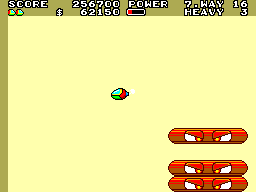
Fantasy Zone II – The Tears of Opa-Opa (USA, Europe)
0 1 0
Fantasy Zone II – The Tears of Opa-Opa (USA, Europe) is a classic Master System shoot ’em up that pairs bright visuals with straightforward arcade gameplay. You control a small combat craft through levels filled with enemies, moving across side-scrolling stages that demand quick reflexes and pattern recognition. The game’s design reflects its arcade origins, focusing on fast-paced action rather than complex storytelling. As a piece of 8-bit gaming history, it offers both nostalgia and a challenge for players today.
The game’s vibrant style and lively soundtrack stand out, capturing the spirit of early 80s arcade shooters. Its colorful, cartoon-like graphics make it visually appealing, while the energetic music keeps the mood lively. Playing involves flying through levels, avoiding enemy fire, and shooting down foes, which creates a fast and satisfying experience. The game is easy to pick up but tough to master, encouraging you to keep trying to improve your score or last longer.
Why Fantasy Zone II – The Tears of Opa-Opa Is Worth Playing
The visual style holds up well, with bright sprites and animated backgrounds that add charm. The design ensures you can easily spot threats and opportunities, while the soundtrack complements the chaos of each level. The core gameplay—flying, dodging, shooting—remains engaging and quick-moving. It balances accessibility with enough challenge to keep things interesting, making each session feel intense yet manageable.
Players often revisit because of its simple mechanics paired with the challenge of enemy patterns and level design. Short, fast-paced rounds make it perfect for quick gaming sessions. Its appeal lies in the combination of straightforward gameplay and the satisfaction of improving at the game or setting high scores. Fans of retro arcade shooters who enjoy colorful visuals and tight mechanics will find a lot to like here.
Tips to Get Ahead
If you want to do better in Fantasy Zone II – The Tears of Opa-Opa, keep these tips in mind:
- Learn enemy movement patterns—most waves follow predictable paths, so recognizing them helps you dodge more effectively.
- Take shots from afar when possible, especially in tight spots, to keep safe from close-range threats.
- Use power-ups carefully to boost your firepower without risking unnecessary exposure.
- Memorize level layouts to anticipate enemy placements and plan your route through each stage.
- Keep moving—staying mobile makes it easier to avoid enemy fire and find safe positions.
- If enemies become overwhelming, stepping back to reposition can be a smart move for survival.
Things to Know Before You Start
How long does a typical game last?
Most rounds are pretty quick, often just a few minutes, which makes it easy to play in short bursts or aim for high scores.
Is Fantasy Zone II – The Tears of Opa-Opa challenging?
It’s moderately difficult, with difficulty gradually increasing as you progress. Learning enemy patterns can take some practice, but most players can get the hang of it with time.
Is this suitable for casual players?
Yes, its simple mechanics and lively visuals make it accessible, though getting good at it does require some effort. It’s a good pick for both casual players and fans who enjoy classic shoot ’em ups.
Jump into Fantasy Zone II – The Tears of Opa-Opa and see how you handle its colorful chaos. This game remains a fun, fast-paced challenge that’s easy to start but tough to master, making it a solid choice for any retro gaming collection.
Related games: you can also try Ayrton Senna's Super Monaco GP II (Europe) and Play 20 em 1 (Brazil), or browse all other games in the Master System category.
How to Play Fantasy Zone II – The Tears of Opa-Opa (USA, Europe)?
Control your ship to shoot enemies and dodge their attacks across side-scrolling levels, aiming for high scores and survival. Learn enemy patterns and move quickly to stay safe and progress.
Game Controls
Arrow keys act as the D-pad; action buttons are mapped to on-screen keys or keyboard keys.
You may be interested in:
-
 Master System
♥ 6
Zool – Ninja of the ‘Nth’ Dimension (Europe)
Master System
♥ 6
Zool – Ninja of the ‘Nth’ Dimension (Europe) -
 Master System
♥ 2
Zillion II – The Tri Formation (World)
Master System
♥ 2
Zillion II – The Tri Formation (World) -
 Master System
♥ 3
Zillion (USA) (v1.1)
Master System
♥ 3
Zillion (USA) (v1.1) -
 Master System
♥ 1
Zillion (Japan, Europe) (En,Ja)
Master System
♥ 1
Zillion (Japan, Europe) (En,Ja) -
 Master System
♥ 1
Zillion (Europe) (v1.2)
Master System
♥ 1
Zillion (Europe) (v1.2) -
 Master System
♥ 1
Zaxxon 3-D (World) (Beta)
Master System
♥ 1
Zaxxon 3-D (World) (Beta) -
 Master System
♥ 1
Zaxxon 3-D (World)
Master System
♥ 1
Zaxxon 3-D (World) -
 Master System
♥ 1
Xenon 2 – Megablast (Europe) (Virgin)
Master System
♥ 1
Xenon 2 – Megablast (Europe) (Virgin)
Comments (0)
No comments yet. Be the first to comment!