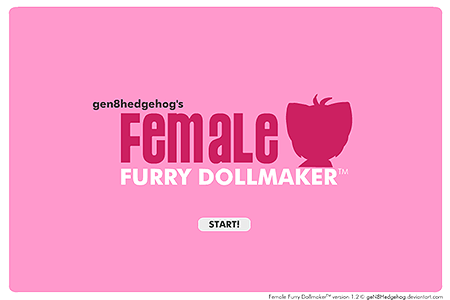
Female Furry Dollmaker
0 50 50
The Female Furry Dollmaker is a charming online game that lets players create adorable, personalized furry characters. Perfect for fans of dress-up games and imaginative customization, this free browser game offers a nostalgic feel with simple yet engaging gameplay. Whether you enjoy designing cute creatures or just like tinkering with colorful outfits and accessories, it provides a relaxing, enjoyable experience you can take your time with.
Instead of fast-paced action, the game focuses on assembling and customizing furry dolls in an easy-to-understand way. It’s a good choice if you’re after a casual activity that still feels rewarding. Since it runs directly in your browser, you can play it on desktop or mobile devices. As you move through different options, the emphasis remains on creativity and personalization, making each session a chance to experiment with styles, colors, and accessories for your furry characters.
Getting Into Female Furry Dollmaker
The core of the game involves choosing various parts to build your furry doll. Starting with a blank slate, you can pick from a wide selection of body shapes, fur colors, and facial features. Once the base is set, you can style your character with clothing, accessories, hairstyles, and more. The game encourages mixing and matching to create a look that feels uniquely yours.
A typical session involves browsing through different categories to customize your furry doll’s appearance and wardrobe. The interface is straightforward—just drag and drop or click to add items. You can try out different themes, from cute and cuddly to edgy and daring. There’s no rush or strict goal, so you can take your time perfecting each detail. When you’re happy with your creation, you can save it or start over for more design fun. Its relaxed pace makes it suitable for quick play or long creative afternoons.
Standout Features
The vibrant, cartoon-like graphics give the Female Furry Dollmaker a cheerful look that appeals to all ages. The character customization options are broad, with many fur patterns, accessories, and outfits to make each furry doll stand out. The interface is simple but effective, letting you focus on your designs without distraction.
As you collect more items and options, the possibilities grow. Unlocking new accessories and clothing encourages revisiting the game and trying different combinations. The mechanics are straightforward and offer plenty of room for creativity, giving it lasting appeal. It’s a quiet, fun way to spend time creating characters that reflect your style and mood.
Strategy and Tips
To get the most out of your time with Female Furry Dollmaker, a few tips can help. While the game is easy to pick up, a little guidance can make the process more enjoyable.
- Explore all categories to find hidden accessories and clothing that can add extra flair.
- Save your favorite designs so you can revisit or combine elements later without losing your work.
- Try different color combinations—sometimes contrasting shades make your characters pop.
- Experiment with various fur patterns and facial features to give your dolls distinct personalities.
- Use themed outfits for specific moods or ideas, like seasonal costumes or fantasy looks.
- Take your time during each session—there’s no rush, so enjoy exploring all the options at your own pace.
- If you need inspiration, browse previous creations or mix elements from different dolls to spark new ideas.
Quick Questions
How do I start creating my furry doll in Female Furry Dollmaker?
Just open the game, and you’ll see a blank character. Use the menus to customize your furry doll’s look and outfit.
What if I want a more detailed or themed character?
Use the wide range of accessories, clothing, and facial features to match your theme. Don’t hesitate to experiment until you find a look you like.
Can I play Female Furry Dollmaker on my phone or tablet without issues?
Yes, it’s designed to run smoothly on both desktop and mobile, so you can create furry characters anytime inspiration hits, even when you’re on the go.
This simple, charming game offers a fun way to pass the time while expressing your creativity. The Female Furry Dollmaker stands out as a colorful, relaxing experience that invites endless customization. Whether you’re into designing characters or just looking for a casual creative outlet, it’s a great option for building and styling furry characters that reflect your personality and imagination.
Related games: you can also try Anime Face Maker and LRD: Rebirth, or browse all other games in the Flash category.
How to Play Female Furry Dollmaker?
Choose and customize parts to build and style your furry doll using simple drag-and-drop or click actions. Take your time to create unique characters, then save or restart to try different designs.
Game Controls
Click or drag with mouse to select and place items, no keyboard controls needed.
You may be interested in:
-
 Flash
♥ 0
Nick Jr. Jukebox
Flash
♥ 0
Nick Jr. Jukebox -
 Flash
♥ 0
Go Diego Go: Rainforest Adventure
Flash
♥ 0
Go Diego Go: Rainforest Adventure -
 Flash
♥ 0
Dora’s Star Mountain Mini-Golf!
Flash
♥ 0
Dora’s Star Mountain Mini-Golf! -
 Flash
♥ 0
Dora the Explorer: Say It Two Ways
Flash
♥ 0
Dora the Explorer: Say It Two Ways -
 Flash
♥ 0
Mr. Meaty Treasures Of The Deep
Flash
♥ 0
Mr. Meaty Treasures Of The Deep -
 Flash
♥ 0
SpongeBob’s Pizza Toss!
Flash
♥ 0
SpongeBob’s Pizza Toss! -
 Flash
♥ 0
SpongeBob Squarepants: Squeaky Boot Blurbs
Flash
♥ 0
SpongeBob Squarepants: Squeaky Boot Blurbs -
 Flash
♥ 0
SpongeBob: Coloring Book
Flash
♥ 0
SpongeBob: Coloring Book
Comments (0)
No comments yet. Be the first to comment!