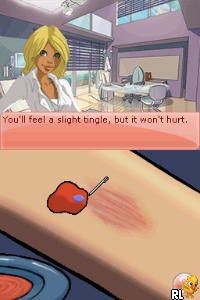
Imagine – Family Doctor (USA) (En,Fr,Es)
0 1 0
Imagine – Family Doctor (USA) (En,Fr,Es) is a straightforward Nintendo DS game that puts players in the role of a healthcare professional managing patient care. With its simple interface and familiar touch-screen controls, it’s easy to pick up and suitable for players of all ages. As a nostalgic throwback from the Nintendo DS days, it offers a calming experience focused on diagnosis and treatment in a virtual clinic setting.
What Is Imagine – Family Doctor?
This game belongs to the simulation genre, specifically about medical practice. Players act as a family doctor, receiving patient appointments and diagnosing various ailments based on symptoms and patient history. The gameplay involves choosing treatments, managing schedules, and keeping patients satisfied. Its mechanics are straightforward, emphasizing casual decision-making rather than complex systems or quick reflexes.
The main focus is caring for a variety of patients, each with their own health concerns. The game encourages patience and attention to detail as players work through different cases, aiming to improve their virtual clinic’s reputation. Its approachable style makes it suitable for younger players or anyone looking for a relaxed, non-violent simulation on their Nintendo DS.
What Keeps You Coming Back
One of the things players enjoy is the variety of patient cases, which encourages thinking about each diagnosis carefully. As you progress, new symptoms and scenarios appear, keeping things fresh without making it overly complicated. The simple interface and touch controls make quick interactions easy, making short, casual play sessions satisfying and easy to pick up again later.
Replayability comes from managing your clinic’s reputation and trying different treatment options. Since each patient has unique symptoms, players often experiment with various approaches to see what works best. The game’s gentle difficulty and forgiving mechanics make it accessible for multiple playthroughs without frustration, making it a relaxing choice for fans of care-themed and simulation titles.
Handy Tips
If you want to get the most out of Imagine – Family Doctor, here are some tips:
- Pay close attention to patient symptoms and history for accurate diagnoses.
- Manage your appointment schedule efficiently to avoid long waits and keep patients happy.
- Try different treatments to see which ones work best for each case.
- Use the touch screen to make quick selections and keep things running smoothly.
- Watch your clinic’s reputation gauge, which affects how many patients come in and how satisfied they are.
Player FAQ
Is Imagine – Family Doctor easy for kids or casual players?
Yes, the controls are simple, and the tasks don’t require much experience, making it accessible for children and casual players.
Can I play Imagine – Family Doctor offline?
Definitely. Once loaded on this site, the game runs directly in your browser, so no internet connection is needed after the initial load.
Is Imagine – Family Doctor good for quick sessions?
Yes, the game is designed for short, relaxed play sessions, so you can enjoy quick bursts of gameplay without losing progress.
Imagine – Family Doctor offers a gentle simulation experience that’s easy to enjoy in your browser. Its simple mechanics and charming premise make it a good choice for casual players and fans of classic Nintendo DS titles. Whether you’re diagnosing patients or running your clinic, it provides a calm, nostalgic experience in a familiar handheld format.
Related games: you can also try Arthur and the Revenge of Maltazard (Europe) (En,Fr,De,Es,It,Nl) and Crayola Treasure Adventures (USA), or browse all other games in the Nintendo DS category.
How to Play Imagine – Family Doctor (USA) (En,Fr,Es)?
Diagnose and treat patients by selecting symptoms and treatments, managing appointments, and keeping patients satisfied to improve your clinic's reputation.
Game Controls
Arrow keys for navigation; Enter to select; use the keyboard to interact with touch-screen options.
You may be interested in:
-
 Nintendo DS
♥ 1
Casper’s Scare School – Classroom Capers (USA)
Nintendo DS
♥ 1
Casper’s Scare School – Classroom Capers (USA) -
 Nintendo DS
♥ 1
Zunou Nouryoku Koujou Machine – Touch de Zunoo DS (Japan)
Nintendo DS
♥ 1
Zunou Nouryoku Koujou Machine – Touch de Zunoo DS (Japan) -
 Nintendo DS
♥ 1
Zunou ni Asekaku Game Series! Vol. 1 – Cool 104 Joker & Setline (Japan)
Nintendo DS
♥ 1
Zunou ni Asekaku Game Series! Vol. 1 – Cool 104 Joker & Setline (Japan) -
 Nintendo DS
♥ 9
Zuma’s Revenge (USA)
Nintendo DS
♥ 9
Zuma’s Revenge (USA) -
 Nintendo DS
♥ 1
Zubo (USA) (En,Fr,Es)
Nintendo DS
♥ 1
Zubo (USA) (En,Fr,Es) -
 Nintendo DS
♥ 1
Zubo (Europe) (En,Fr,De,Es,It,Nl,Sv)
Nintendo DS
♥ 1
Zubo (Europe) (En,Fr,De,Es,It,Nl,Sv) -
 Nintendo DS
♥ 1
Zorro – Quest for Justice (USA) (En,Fr,De,Es,It)
Nintendo DS
♥ 1
Zorro – Quest for Justice (USA) (En,Fr,De,Es,It) -
 Nintendo DS
♥ 1
Zorro – Quest for Justice (Europe) (En,Fr,De,Es,It)
Nintendo DS
♥ 1
Zorro – Quest for Justice (Europe) (En,Fr,De,Es,It)
Comments (0)
No comments yet. Be the first to comment!