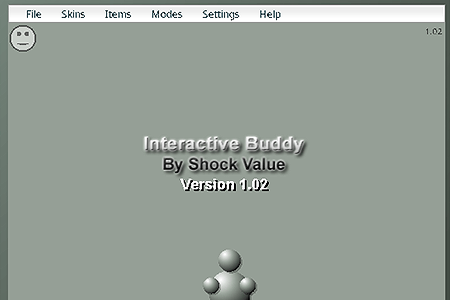
Interactive Buddy
0 50 50
Interactive Buddy: Gameplay Overview
Interactive Buddy is a browser-based sandbox game that uses Flash, appealing to players who enjoy freeform creative expression and spontaneous experimentation. Its simple premise invites you into a virtual space where you can manipulate a basic character called the “Buddy” with various tools, effects, and interactions. Unlike structured games with specific objectives or levels, this game thrives on the freedom to explore and create chaos or calm, making each session feel fresh and unpredictable.
The main mechanic involves clicking, dragging, and combining different objects and effects to see how the Buddy responds. Whether you’re tossing objects, applying visual effects, or triggering physics-based reactions, the game encourages experimentation without restrictions. Its intuitive interface makes it easy for newcomers to get started, while the range of possible interactions keeps things interesting over time. As you discover new combinations and reactions, the sandbox environment becomes a lively playground filled with surprises, making every moment of play a new adventure.
Modes, Levels and Progression
Instead of traditional levels or missions, Interactive Buddy offers an open-ended experience driven by curiosity and creativity. The game’s tools, objects, and effects can be unlocked or discovered through exploration, inviting you to set your own goals. Whether you want to create funny scenarios, test physics, or just relax with creative play, there’s no fixed endpoint. This encourages players to come back and see what new interactions they can make.
From time to time, updates or new releases may add more tools or effects, expanding what you can do in the sandbox. Still, the main attraction is its unrestricted nature—you’re free to explore at your own pace, creating chaos or calm as you wish. Without structured levels, there’s no pressure to progress or beat challenges, which means every session can be different. Whether you spend five minutes or an hour, each experience can be unique, giving plenty of room for discovery and fun.
Winning Strategies
Since Interactive Buddy is mainly a sandbox game, success is about having fun and being creative through experimentation. Here are some ways to make the most of it:
- Try different combinations: Mix objects and effects to see what surprising reactions you get.
- Manipulate the environment: Use the surroundings to influence the Buddy’s reactions—sometimes a small change makes a big difference.
- Understand physics: Many effects depend on realistic physics; knowing how objects move and interact can help you craft more complex setups.
- Save your favorite scenes: Remember or recreate setups that produce funny or impressive results for quick access later.
- Take your time: Rushing can limit your discoveries. Slow, deliberate actions often lead to the best surprises.
- Try odd actions: Don’t hesitate to experiment with unconventional or silly interactions—they often lead to the funniest moments.
- Explore effects thoroughly: Combining small effects with other tools can create remarkable and humorous outcomes, so keep experimenting.
Common Questions About Interactive Buddy
How does the complexity or difficulty change in Interactive Buddy?
The game doesn’t have difficulty levels. Instead, complexity depends on how creatively you combine objects and effects. As you discover more interactions, your setups can become more elaborate, but there are no challenges or levels to complete, making it accessible for all ages and skill levels.
Are there different modes or levels within Interactive Buddy?
It mainly functions as a sandbox environment without preset levels or modes. The core experience is about freeform experimentation, though some versions or updates might add new tools or effects. Still, there’s no restriction on what you can try or create.
How much replay value does Interactive Buddy have, especially since it’s a Flash game?
Replayability is high because of its open-ended nature. Since there’s no fixed ending, each session can be different based on your choices and experiments. Its simple mechanics and wide range of interactions help keep boredom at bay, although the decline in Flash support might affect its longevity unless you use emulators or other platforms. For casual players looking for spontaneous fun, it offers plenty of entertainment.
Overall, the appeal of Interactive Buddy comes from its unrestrained sandbox style, blending straightforward mechanics with endless opportunities for creativity. Whether you’re after a quick distraction or a space to explore your ideas, this game invites you to experiment and enjoy in a relaxed way. Play online and see where your creativity takes you with Interactive Buddy.
Related games: you can also try Whack Your Boss and Stick RPG Complete, or browse all other games in the Flash category.
How to Play Interactive Buddy?
Click, drag, and combine objects and effects to interact with the Buddy and see how he responds. Explore freely to create fun, chaotic, or calm scenes without specific goals.
Game Controls
Use mouse to click, drag, and apply tools and effects.
You may be interested in:
-
 Flash
♥ 0
Nick Jr. Jukebox
Flash
♥ 0
Nick Jr. Jukebox -
 Flash
♥ 0
Go Diego Go: Rainforest Adventure
Flash
♥ 0
Go Diego Go: Rainforest Adventure -
 Flash
♥ 0
Dora’s Star Mountain Mini-Golf!
Flash
♥ 0
Dora’s Star Mountain Mini-Golf! -
 Flash
♥ 0
Dora the Explorer: Say It Two Ways
Flash
♥ 0
Dora the Explorer: Say It Two Ways -
 Flash
♥ 0
Mr. Meaty Treasures Of The Deep
Flash
♥ 0
Mr. Meaty Treasures Of The Deep -
 Flash
♥ 0
SpongeBob’s Pizza Toss!
Flash
♥ 0
SpongeBob’s Pizza Toss! -
 Flash
♥ 0
SpongeBob Squarepants: Squeaky Boot Blurbs
Flash
♥ 0
SpongeBob Squarepants: Squeaky Boot Blurbs -
 Flash
♥ 0
SpongeBob: Coloring Book
Flash
♥ 0
SpongeBob: Coloring Book
Comments (0)
No comments yet. Be the first to comment!