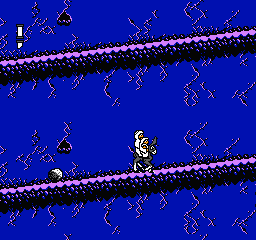
King of Kings, The (USA) (Unl) (v1.3)
0 26 26
Step Into the World of King of Kings, The (USA)
King of Kings, The (USA) is a nostalgic piece from the NES era, a console that shaped 8-bit gaming for many. Its pixelated visuals and chiptune soundtrack bring to mind a time when games were simple but still challenging. The game feels like a medieval adventure with an educational twist, blending learning with classic gameplay mechanics. When you try this NES classic in your browser, you’ll notice the charming graphics that take you straight back to the 80s and early 90s, where every pixel had its place.
The sound design is minimal but effective, with basic melodies that repeat and evoke a sense of nostalgia. The visuals lean on blocky sprites and simple backgrounds, focusing on gameplay rather than fancy effects. Despite its simplicity, the game creates a focused environment that sparks curiosity about the historical or educational themes it covers. Playing this feels like flipping through an old textbook, but with the added excitement of interactive challenges.
How the Gameplay Hooks You
This NES game offers a steady, educational experience with a clear sense of progression. The gameplay revolves around learning goals, which are woven into levels or challenges that grow in difficulty. Each stage delivers new facts or insights, keeping the pace lively enough to hold your interest without feeling overwhelming. The structure encourages multiple attempts, with players eager to improve their understanding or performance as they move forward.
Designed with learning in mind, the game balances challenge with accessibility. Its mechanics are simple, so it’s easy to pick up and enjoy even during short sessions. The pacing makes sure you’re not bogged down by difficulty, but you still get a sense of achievement as you gather educational content. This makes it suitable for quick breaks or longer focused periods of learning, all within the familiar NES gameplay style that many remember fondly.
Pro Tips for King of Kings, The (USA)
Start with the basics to get comfortable with how the game flows before trying more difficult sections.
- Pay close attention to visual hints—they often suggest the right answers or next steps.
- Take short breaks between levels to review what you’ve learned and prepare for what’s ahead.
- If you’re stuck, go back to earlier parts to reinforce your understanding before moving forward.
- Try to finish levels in fewer attempts to boost your score and remember the educational material better.
- Keep in mind that the game is designed for learning, so don’t rush—absorb the info at your own pace.
Frequently Asked Questions
Question?
Does the game have a fixed difficulty, or can it be adjusted?
This NES title keeps a steady difficulty level typical of educational games from that period, focusing on gradual learning rather than intense challenge. It doesn’t offer adjustable settings, but its simple mechanics keep it accessible for most players.
Question?
Will I find the game long or short?
It’s designed for quick sessions, with each level or challenge providing bite-sized bits of information. Perfect for short learning breaks or quick gaming moments.
Question?
Is this suitable for all ages?
Yes, its educational focus and simple visuals make it good for a wide age range, from young children to adults interested in history or learning through play.
Closing
King of Kings, The (USA) offers a look back at how NES games combined education with gameplay. Its straightforward design and nostalgic style make it memorable for those who want a bit of learning and fun. Playing in your browser keeps that classic NES vibe alive, inviting you to explore history and knowledge with every pixel and sound.
Related games: you can also try Home Run Nighter '90 – The Pennant League (Japan) and Duck Tales 2 (Japan), or browse all other games in the NES category.
How to Play King of Kings, The (USA) (Unl) (v1.3)?
Navigate levels to learn educational facts while avoiding obstacles. Complete challenges and progress through stages by collecting knowledge points and answering questions correctly.
Game Controls
Arrow keys move the character; specific keys act as action buttons for jumping and interacting.
You may be interested in:
-
![Zombie Hunter (Japan) [En by KingMike v1.01]](https://www.playf2p.com/wp-content/uploads/zombie-hunter-japan-en-by-kingmike-v1-01-200x120.png) NES
♥ 2
Zombie Hunter (Japan) [En by KingMike v1.01]
NES
♥ 2
Zombie Hunter (Japan) [En by KingMike v1.01] -
 NES
♥ 1
Zombie Hunter (Japan)
NES
♥ 1
Zombie Hunter (Japan) -
 NES
♥ 1
Zoids Mokushiroku (Japan)
NES
♥ 1
Zoids Mokushiroku (Japan) -
 NES
♥ 2
Zoids 2 – Zenebas no Gyakushuu (Japan)
NES
♥ 2
Zoids 2 – Zenebas no Gyakushuu (Japan) -
 NES
♥ 1
Zoids – Chuuou Tairiku no Tatakai (Japan)
NES
♥ 1
Zoids – Chuuou Tairiku no Tatakai (Japan) -
 NES
♥ 11
Zippy Race (Japan)
NES
♥ 11
Zippy Race (Japan) -
 NES
♥ 1
Zhen Ben Xi You Ji (Asia) (Unl)
NES
♥ 1
Zhen Ben Xi You Ji (Asia) (Unl) -
 NES
♥ 1
Zenbei!! Pro Basket (Japan)
NES
♥ 1
Zenbei!! Pro Basket (Japan)
Comments (0)
No comments yet. Be the first to comment!