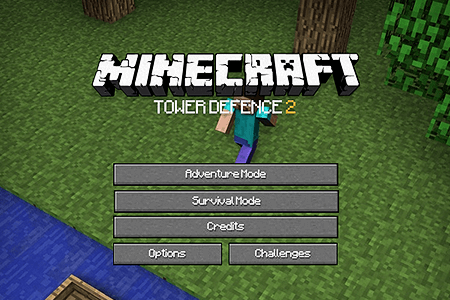
Minecraft Tower Defence 2
0 50 50
Minecraft Tower Defence 2 combines classic tower defense gameplay with the charming pixelated world of Minecraft. As a free browser game, it pulls players into a blocky, retro-inspired setting where quick thinking and strategy are key. The visuals are simple but colorful, capturing that nostalgic Minecraft feel—great for quick sessions or casual play whenever you have a few minutes. Its straightforward mechanics and engaging challenge make it appealing to both Minecraft fans and tower defense enthusiasts.
Set against a pixel-art Minecraft backdrop, Minecraft Tower Defence 2 has a playful, lighthearted vibe that still requires some planning. The familiar terrain, complete with creepers and mobs, draws players in right away. Despite its simple look, the game offers layers of strategy—waves of enemies approach, and it’s up to you to deploy and upgrade towers effectively to keep them at bay. It’s accessible for newcomers, but as you progress, it pushes you to think ahead and stay adaptable. The game’s addictive quality comes from how easy it is to start playing yet how challenging it can get as the waves grow tougher and the need for strategic choices increases.
Why Minecraft Tower Defence 2 Is Worth Playing
The pixel art style is a big part of what makes Minecraft Tower Defence 2 enjoyable. It’s simple but appealing, and fans of Minecraft’s look will recognize it immediately. This aesthetic keeps things clean and uncluttered, so your focus stays on the strategy. The game surprisingly offers depth—deciding where to place towers, which types to build, and when to upgrade all create a satisfying puzzle. The playful tone keeps frustration at bay, making it inviting whether you’re just passing time or trying to beat your high score. The variety of enemy types and upgrade options means no two runs are exactly the same, encouraging multiple playthroughs.
The sound design is minimal, with subtle effects that build tension without overwhelming the senses. This makes it a solid choice for quick, engaging gameplay sessions. Minecraft Tower Defence 2 strikes a balance between accessible fun and strategic depth, making it a go-to for anyone looking for a casual browser game that still offers a challenge.
Tips to Get Ahead
Getting started with Minecraft Tower Defence 2 is simple, but mastering it takes some planning. Here are some tips to help you improve your gameplay:
- Place towers at choke points: Position them where enemies are funneled through narrow spots for maximum damage.
- Upgrade wisely: Focus on improving your most effective towers first rather than spreading resources too thin.
- Use a mix of tower types: Combine different defenses to handle various enemy types, especially as tougher mobs appear.
- Save resources for emergencies: Keep some points in reserve to reinforce key positions or upgrade crucial towers when needed.
- Observe enemy patterns: Pay attention to their speed and attack styles to anticipate their moves and adjust accordingly.
- Start with a balanced setup early on: Establish a solid defense from the beginning to avoid being overwhelmed later.
- Be patient and strategic: Sometimes waiting to upgrade or reposition towers can make all the difference in the long run.
Things to Know Before You Start
Before jumping into Minecraft Tower Defence 2, it’s good to have some expectations. Here are common questions and practical answers:
Question?
Is Minecraft Tower Defence 2 suitable for beginners?
Yes, the mechanics are straightforward, making it easy for new players. As enemy waves get tougher, a little strategic thinking becomes necessary to keep progressing.
Question?
How long does a typical game last?
Most matches take around 10 to 20 minutes, which is perfect for quick breaks. If you’re aiming for high scores or perfect runs, you might want to spend some extra time refining your tactics.
Question?
Can I play Minecraft Tower Defence 2 on mobile devices or offline?
It’s designed to be played online through your browser, so offline or mobile app versions aren’t available. Still, its simplicity means you can access it from most devices with an internet connection easily.
Question?
What if I get stuck on a level?
Try repositioning towers or upgrading different defenses. Small adjustments or a different approach can often turn things around and help you advance further.
If you’re after a pixel-art tower defense game that’s easy to pick up but still challenging enough to keep you engaged, Minecraft Tower Defence 2 fits the bill. Its nostalgic visuals and strategic gameplay make it a solid choice for players of all ages. Jump in, build your defenses, and see how long you can hold off the pixel hordes!
Related games: you can also try Pac-Man and Escaping the Prison, or browse all other games in the Flash category.
How to Play Minecraft Tower Defence 2?
Place and upgrade towers along enemy paths to stop waves of mobs from reaching the end. Manage your resources and plan your defenses carefully to survive increasingly tough enemies.
Game Controls
Use the mouse to select and place towers, click to upgrade or sell, and press buttons on-screen for game options.
You may be interested in:
-
 Flash
♥ 0
Nick Jr. Jukebox
Flash
♥ 0
Nick Jr. Jukebox -
 Flash
♥ 0
Go Diego Go: Rainforest Adventure
Flash
♥ 0
Go Diego Go: Rainforest Adventure -
 Flash
♥ 0
Dora’s Star Mountain Mini-Golf!
Flash
♥ 0
Dora’s Star Mountain Mini-Golf! -
 Flash
♥ 0
Dora the Explorer: Say It Two Ways
Flash
♥ 0
Dora the Explorer: Say It Two Ways -
 Flash
♥ 0
Mr. Meaty Treasures Of The Deep
Flash
♥ 0
Mr. Meaty Treasures Of The Deep -
 Flash
♥ 0
SpongeBob’s Pizza Toss!
Flash
♥ 0
SpongeBob’s Pizza Toss! -
 Flash
♥ 0
SpongeBob Squarepants: Squeaky Boot Blurbs
Flash
♥ 0
SpongeBob Squarepants: Squeaky Boot Blurbs -
 Flash
♥ 0
SpongeBob: Coloring Book
Flash
♥ 0
SpongeBob: Coloring Book
Comments (0)
No comments yet. Be the first to comment!