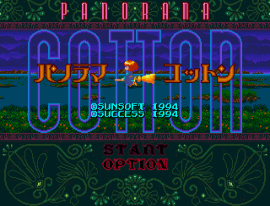
Panorama Cotton (Japan)
0 4 0
Panorama Cotton (Japan) is a classic Genesis shooter that offers a lively, colorful experience rooted in the platform’s 16-bit era. Originally released in Japan, it features a playful, cartoon-style aesthetic paired with fast-paced gameplay that appeals to fans of arcade-style shooters. This browser-based emulation allows you to jump right in without any hassle, making it a good pick for players craving a nostalgic, action-packed ride.
Getting Into Panorama Cotton
At its core, Panorama Cotton is a horizontal shooter where you control a flying character through levels filled with enemies, obstacles, and decorative backgrounds. The gameplay is straightforward—your main task is to shoot everything on the screen while avoiding incoming fire and hazards. Each stage involves defeating enemies, collecting power-ups, and moving forward.
Levels are pretty simple: start at the beginning, clear out enemies, and navigate carefully. The game rewards quick reflexes and pattern recognition, with difficulty gradually increasing as you progress. It’s easy for newcomers to pick up, but still offers enough challenge for experienced players aiming for high scores or perfect runs.
Standout Features
The visuals are bright and cheerful, with lively character designs that give each level a fun atmosphere. The backgrounds have enough detail to create a sense of depth, but they don’t distract from the action. The sprite work stays clear even during hectic battles, making it easier to keep track of enemies and projectiles. Its art style has a charming, cartoonish feel that sets it apart from more serious shooters of that time.
Progression depends on clearing stages and defeating bosses, with each level showcasing a different theme and enemy patterns. While it doesn’t have branching paths or multiple endings, replay value comes from mastering the game and beating your high scores. The simple mechanics make it easy to learn but tough to perfect, encouraging multiple tries to improve timing and accuracy.
Strategy and Tips
Getting good at Panorama Cotton involves recognizing enemy patterns and timing your power-ups well. Staying mobile and choosing when to fire conservatively can help you last longer. Here are some tips:
- Focus on dodging enemy fire rather than just shooting; survival comes first.
- Grab power-ups whenever you see them to boost your firepower and gain temporary invincibility.
- Watch enemy movements to anticipate attacks and avoid unnecessary damage.
- Use the edges of the screen to your advantage, trapping enemies or avoiding fire in tight spots.
- Practice your shot timing to maximize damage without wasting bullets.
- Take your time through levels; patience helps you find safe routes and see enemy spawn points.
Quick Questions
Is Panorama Cotton easy for beginners?
The game has simple controls and bright visuals, making it accessible for newcomers. Still, the rising difficulty means some practice is needed to get comfortable.
How long does a typical session last?
A single run through a level usually takes a few minutes, but trying to finish all stages or beat your high score can extend your playtime.
Can I play Panorama Cotton on mobile devices or touch screens?
Yes, since it runs in your browser, you can play on mobile devices with touch controls. Though, precise movement might be easier with a keyboard or gamepad.
Playing Panorama Cotton here means quick access to a fun, colorful shooter that echoes the spirit of classic Genesis titles. Its straightforward gameplay and bright visuals make it a solid choice for fans of retro arcade shooters looking for a quick, engaging challenge.
Related games: you can also try Monster's Inc. God Mode and Flames in Sonic 1, or browse all other games in the Genesis category.
How to Play Panorama Cotton (Japan)?
Control the flying character to shoot enemies, dodge obstacles, and clear each level by defeating enemies and bosses. Collect power-ups to increase firepower and survive longer through quick reflexes and pattern recognition.
Game Controls
Arrow keys move the character; action buttons are mapped to keyboard keys for shooting and special moves.
You may be interested in:
-
 Genesis
♥ 1
Pete Sampras Tennis (USA, Europe) (J-Cart)
Genesis
♥ 1
Pete Sampras Tennis (USA, Europe) (J-Cart) -
 Genesis
♥ 1
Pete Sampras Tennis (Europe) (Beta)
Genesis
♥ 1
Pete Sampras Tennis (Europe) (Beta) -
 Genesis
♥ 1
Pepenga Pengo (Japan)
Genesis
♥ 1
Pepenga Pengo (Japan) -
 Genesis
♥ 1
Pele! (USA, Europe)
Genesis
♥ 1
Pele! (USA, Europe) -
 Genesis
♥ 2
Pele II – World Tournament Soccer (USA, Europe)
Genesis
♥ 2
Pele II – World Tournament Soccer (USA, Europe) -
 Genesis
♥ 1
Pat Riley Basketball (USA)
Genesis
♥ 1
Pat Riley Basketball (USA) -
 Genesis
♥ 1
Party Quiz Mega Q (Japan)
Genesis
♥ 1
Party Quiz Mega Q (Japan) -
 Genesis
♥ 32
Pantufa the cat : Extended Edition
Genesis
♥ 32
Pantufa the cat : Extended Edition
Comments (0)
No comments yet. Be the first to comment!