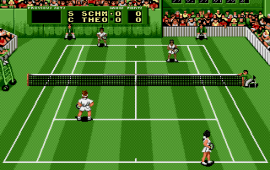
Pete Sampras Tennis (USA, Europe) (J-Cart)
0 1 0
Pete Sampras Tennis (USA, Europe) (J-Cart) is a classic Genesis sports game that puts a tennis match right into your browser. If you like simple sports simulations with a nostalgic 16-bit style, this game offers a straightforward experience rooted in the Genesis era. It’s perfect for quick matches, easy controls, and focusing on gameplay rather than complicated storylines or mechanics.
Getting Into Pete Sampras Tennis
This game features basic tennis matches where you pick a player and face off against an opponent. The main gameplay involves serving, rallying, and trying to outscore your opponent within tennis rules. Matches are short, so it’s great for quick sessions or casual play. The controls are simple—usually just directional movement and a button for shots—making it accessible for both new players and those more experienced.
Most games start with a quick menu choice for singles or doubles, then you’re right into the match. You can practice against AI opponents to get your timing and positioning down, or just jump into a quick game to test your skills. The pace is steady, with each rally offering chances for smart shot placement or powerful shots, depending on your skill level. Since it’s a Genesis classic running in your browser, you get instant play without downloads or setup, so you can jump right in.
Standout Features
Visually, Pete Sampras Tennis captures the look of early 90s sports titles with pixel-art player sprites and simple backgrounds that fit the era. The game’s layout is clean, with clear displays for score, set progress, and serving status, so you always know what’s happening on the court. Even with basic visuals, it’s easy to focus on gameplay rather than flashy effects.
Progression is pretty straightforward—just match after match. The replay value comes from facing different opponents and trying different matchups. Quick matches and easy controls make it simple to experiment with strategies, whether you’re aiming for consistent placement or powerful serves. The simplicity encourages multiple plays, especially if you want to improve your reaction time or shot placement.
Strategy and Tips
Getting the most out of Pete Sampras Tennis involves timing and shot choice. Practice your serve accuracy to score early points, and try to read your opponent’s returns. Mixing up your shots keeps them guessing and stops them from predicting your play.
- Position your player well before each shot to control rally length.
- Use precise timing for power shots to make them more effective without sacrificing accuracy.
- Watch your opponent’s patterns—some prefer certain shots or directions.
- Vary your serves to keep your opponent from easily returning them.
- Don’t rush your shots; patience can help you set up winning rallies.
- Try different strategies in practice matches to find what suits your style best.
Quick Questions
How do I start my first game?
Pick your player and hit start—the game loads instantly in your browser so you can jump right in.
What’s a common beginner mistake?
Trying to hit powerful shots without proper timing often leads to errors. Focus on consistent placement first, then add power.
Can I play Pete Sampras Tennis on my mobile or touch device?
Yes. Since it runs in your browser, you can play on mobile devices with a touch screen, although controls are designed mainly for keyboard or gamepad.
Overall, Pete Sampras Tennis is a straightforward game that emphasizes quick, accessible tennis action. Its nostalgic Genesis style makes it familiar for fans of retro sports titles, and it’s a good choice for a quick match whenever you want to hit the virtual court.
Related games: you can also try Mega Games 3 (Europe) and Mega Turrican (Europe), or browse all other games in the Genesis category.
How to Play Pete Sampras Tennis (USA, Europe) (J-Cart)?
Pick a player, serve, and rally to outscore your opponent in quick tennis matches. Use simple controls to hit, place, and power your shots while focusing on timing and positioning.
Game Controls
Arrow keys move your player; a button is used for shots.
You may be interested in:
-
 Genesis
♥ 1
Pete Sampras Tennis (Europe) (Beta)
Genesis
♥ 1
Pete Sampras Tennis (Europe) (Beta) -
 Genesis
♥ 1
Pepenga Pengo (Japan)
Genesis
♥ 1
Pepenga Pengo (Japan) -
 Genesis
♥ 1
Pele! (USA, Europe)
Genesis
♥ 1
Pele! (USA, Europe) -
 Genesis
♥ 2
Pele II – World Tournament Soccer (USA, Europe)
Genesis
♥ 2
Pele II – World Tournament Soccer (USA, Europe) -
 Genesis
♥ 1
Pat Riley Basketball (USA)
Genesis
♥ 1
Pat Riley Basketball (USA) -
 Genesis
♥ 1
Party Quiz Mega Q (Japan)
Genesis
♥ 1
Party Quiz Mega Q (Japan) -
 Genesis
♥ 32
Pantufa the cat : Extended Edition
Genesis
♥ 32
Pantufa the cat : Extended Edition -
 Genesis
♥ 4
Panorama Cotton (Japan)
Genesis
♥ 4
Panorama Cotton (Japan)
Comments (0)
No comments yet. Be the first to comment!