QWOP
0 50 50
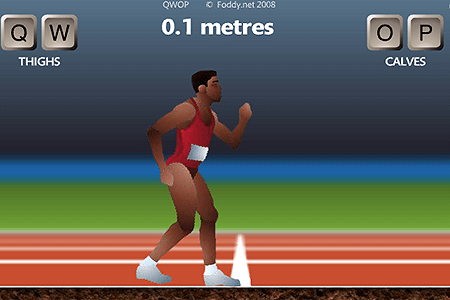
QWOP is one of those classic Flash games that instantly grabs your attention with its quirky challenge and pretty tricky controls. It’s a simple yet frustratingly difficult running game where your goal is to get a sprinter as far as possible—if you can stay upright at all. The game’s charm is in its straightforward idea, which is easy to pick up but tough to master. Perfect for quick play sessions and casual gaming, it’s easy to jump in with just a few keyboard commands. QWOP remains a browser favorite that keeps players entertained, no matter their age.
What Is QWOP?
QWOP is a free online game you can play in your browser. It’s in the sports or simulation genre, but with a funny twist. Instead of racing on a track, you control the legs of an Olympic sprinter using four keys, each managing different muscles. The challenge is to coordinate those controls well enough to run without falling over. It tests your patience, timing, and sometimes luck, leading to plenty of hilarious moments as your character wobbles, stumbles, or falls flat on their face.
Playing QWOP is about finding the balance and control needed to keep your runner upright while moving forward. The gameplay is simple but engaging, as you try to manage the complex controls that often seem counterintuitive. There are no levels or traditional scores—your progress is just how far you get before collapsing. Every run is a new challenge, encouraging experimentation and seeing how far you can push your limits with this quirky, retro browser game.
What Keeps You Coming Back
The fun of QWOP comes from mixing humor with challenge. No matter how many times you stumble, the physics and exaggerated movements keep things interesting. Failing to run further each time still feels like a small victory, and the absurdity of controlling such unwieldy limbs often results in laughs. Since the game is so easy to pick up, it’s a good way to pass a few minutes or challenge friends to see who can go the farthest.
It’s designed to be replayed, thanks to its simplicity and the ongoing effort to beat your best. With each try, you learn more about how to coordinate your key presses, developing your own tricks for staying upright longer. Some players even try to perform silly stunts or see how many steps they can take before falling over. And because there aren’t real penalties for messing up, you can keep trying without worries, making QWOP a fun choice for those who enjoy a tough but amusing browser game.
Handy Tips
If you’re just starting out with QWOP, here are a few ideas to help you stay upright a little longer and enjoy the chaos:
- Take it slow—focus on balancing before trying to run fast.
- Use small, controlled key presses rather than holding keys down too long.
- Notice which limbs cause your falls and adjust your key presses accordingly.
- Practice shifting your weight smoothly before attempting a full run.
- Watch videos of experienced players to pick up new techniques.
- If you get frustrated, take a break and come back with fresh eyes.
- Try different key combinations to see what gives you better control over your runner’s movements.
Player FAQ
Is QWOP easy for new players?
It’s pretty straightforward to start, but mastering the controls takes some patience. Anyone can give it a try right away, though getting good at it means sticking with it.
Can kids play QWOP, or is it too tough?
Older children and teens who like a challenge might enjoy it. The physics can be a bit frustrating for very young players, but older kids often find it hilarious and rewarding once they get the hang of it.
Do you need an internet connection to play QWOP?
Since it runs in your browser, you can play it directly on this site without downloading anything or needing a constant internet connection. It’s great for quick gaming sessions whenever you want some retro fun.
QWOP stands out as a simple but addictive browser game, full of laughs and frustratingly fun moments. Whether you’re racing to beat your personal best or just watching your character tumble in funny ways, it offers plenty of entertainment. The game’s charm comes from turning a basic running challenge into a memorable, often hilarious experience. If you’re up for testing your coordination and patience, give QWOP a try—just don’t be surprised if you spend more time laughing than running.
Related games: you can also try Breaking The Bank and Pico’s School, or browse all other games in the Flash category.
How to Play QWOP?
Control the runner's legs using four keys to move forward without falling over. Keep adjusting your key presses to balance and see how far you can run before collapsing.
Game Controls
Use Q, W, O, P keys to control the legs.
You may be interested in:
-
 Flash
♥ 0
Nick Jr. Jukebox
Flash
♥ 0
Nick Jr. Jukebox -
 Flash
♥ 0
Go Diego Go: Rainforest Adventure
Flash
♥ 0
Go Diego Go: Rainforest Adventure -
 Flash
♥ 0
Dora’s Star Mountain Mini-Golf!
Flash
♥ 0
Dora’s Star Mountain Mini-Golf! -
 Flash
♥ 0
Dora the Explorer: Say It Two Ways
Flash
♥ 0
Dora the Explorer: Say It Two Ways -
 Flash
♥ 0
Mr. Meaty Treasures Of The Deep
Flash
♥ 0
Mr. Meaty Treasures Of The Deep -
 Flash
♥ 0
SpongeBob’s Pizza Toss!
Flash
♥ 0
SpongeBob’s Pizza Toss! -
 Flash
♥ 0
SpongeBob Squarepants: Squeaky Boot Blurbs
Flash
♥ 0
SpongeBob Squarepants: Squeaky Boot Blurbs -
 Flash
♥ 0
SpongeBob: Coloring Book
Flash
♥ 0
SpongeBob: Coloring Book
Comments (0)
No comments yet. Be the first to comment!