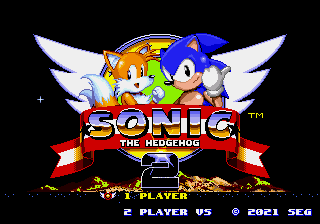
Sonic 2 Painful World Spikes Kazio v2.0
0 1 0
Sonic 2 Painful World Spikes Kazio v2.0 is a browser-based version of a classic Genesis platformer, designed for fans who enjoy tough, fast-paced arcade action. If you like Sonic’s speed but want a more demanding challenge, this game provides a tough, relentless experience. It’s perfect for quick, intense sessions—you can jump right into the browser and get straight into the action.
Getting Into Sonic 2 Painful World Spikes Kazio v2.0
This game follows the familiar structure of Sonic platformers but cranks up the difficulty. The main idea is controlling Sonic as he runs through side-scrolling levels filled with spikes, traps, and hazards that test your reflexes. It emphasizes speed and accuracy, with the goal being to navigate levels quickly while avoiding instant-death obstacles. Unlike later Sonic titles with multiple paths and power-ups, this version sticks to a simple run-and-jump style, so mistakes come at a cost.
Levels are short but intense. You’ll likely need multiple tries to learn the layout and timing of hazards. The game doesn’t have elaborate modes or story elements—it’s about surviving as long as possible and mastering each level. Since it runs in your browser, you can jump in and out quickly, making it great for quick play sessions or testing your skills over several attempts.
Standout Features
The visuals lean toward a pixel-art look reminiscent of the original Genesis graphics, with sharper spikes and clearer hazards. This makes it easier to spot dangers without making the game less difficult. Progression is straightforward—each level is a test of endurance, with no branching paths or unlockables. The real challenge comes from beating your best times or avoiding hazards more efficiently. Replaying the game helps sharpen reflexes as you improve with each run.
The simplicity works in its favor. There are no complex mechanics or unlockables—just pure speed-based platforming focused on dodging spikes and traps. It’s a good choice for players seeking a straightforward, tough challenge. Being a browser game, you can play it anywhere, and the difficulty curve keeps it engaging even after many attempts.
Strategy and Tips
Fast reactions are key. Sometimes slowing down just a little makes timing jumps easier and helps you avoid hazards more effectively.
- Revisit levels often to learn the layout—timing is everything.
- Keep your momentum going; stopping can make dodging spikes harder.
- Practice jumps over hazards to improve your precision, especially in tight spots.
- Try to memorize spike placements rather than reacting to them on the spot.
- Don’t get discouraged if you fail early—each try helps you learn more about the level.
- Adjust your pace based on how crowded the hazards are; sometimes a slower approach works better.
Quick Questions
How do I get started with this game?
Click to load Sonic 2 Painful World Spikes Kazio v2.0 in your browser and start running—no download required.
What’s a common mistake for beginners?
Rushing into hazards without timing your jumps carefully. Slowing down a little can improve your chances of survival.
Can I play on my phone or tablet?
The game runs in your browser, so it might work on mobile devices, but precise timing could be trickier without a keyboard or controller.
Sonic 2 Painful World Spikes Kazio v2.0 offers a straightforward challenge that tests your reflexes and memory. Its difficulty makes it a good pick for players who enjoy mastering tough platformers, all without needing to install anything—just open your browser and start playing.
Related games: you can also try J. League Pro Striker 2 (Japan) and Bishoujo Senshi Sailor Moon EN [v1.0], or browse all other games in the Genesis category.
How to Play Sonic 2 Painful World Spikes Kazio v2.0?
Control Sonic to run and jump through levels filled with spikes and hazards, avoiding obstacles to survive as long as possible and beat your best times.
Game Controls
Arrow keys act as the D-pad; Enter is Start; on-screen mapped keys handle the action buttons
You may be interested in:
-
 Genesis
♥ 61
Sonic 2 Recreation Part One
Genesis
♥ 61
Sonic 2 Recreation Part One -
 Genesis
♥ 1
Sonic 2 Rainbow Edition
Genesis
♥ 1
Sonic 2 Rainbow Edition -
 Genesis
♥ 27
Sonic 2 Modern Neon & Classic Neon
Genesis
♥ 27
Sonic 2 Modern Neon & Classic Neon -
 Genesis
♥ 2
Sonic 2 Migthy The Armadillo
Genesis
♥ 2
Sonic 2 Migthy The Armadillo -
 Genesis
♥ 11
Sonic 2 Megamix
Genesis
♥ 11
Sonic 2 Megamix -
 Genesis
♥ 2
Sonic 2 Master Edition 3 spaces.ru
Genesis
♥ 2
Sonic 2 Master Edition 3 spaces.ru -
 Genesis
♥ 6
Sonic 2 Mania Style
Genesis
♥ 6
Sonic 2 Mania Style -
 Genesis
♥ 7
Sonic 2 Mania Run Sprite
Genesis
♥ 7
Sonic 2 Mania Run Sprite
Comments (0)
No comments yet. Be the first to comment!