Sonic The Hedgehog Fixed Version V1.3
0 7 0
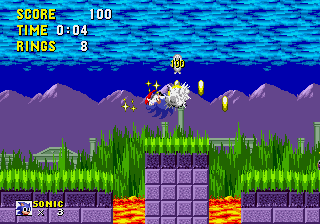
Sonic The Hedgehog Fixed Version V1.3 is a classic Genesis game that you can now play right in your browser. This version keeps the familiar feel but includes some tweaks to improve gameplay and stability. It’s simple enough for newcomers and longtime fans alike, and you can jump in without needing downloads or setup. The controls are straightforward, and the goals are clear, making it easy for players of all ages to enjoy a piece of 16-bit history.
What Is Sonic The Hedgehog Fixed Version V1.3?
This game is a platformer where speed and quick reactions matter most. Your goal is to guide Sonic through different levels, dodging obstacles and enemies while gathering rings. It’s a side-scrolling game that tests your timing, with each stage offering new layouts and challenges. You can play short sessions or longer ones, which makes it good for quick breaks or more extended play.
The core of the game revolves around fast-paced action and tight controls. Sonic’s speed mechanics are front and center, pushing you to keep up momentum and find routes that let you move faster. The visuals are lively, and the soundtrack is catchy, adding to a lively experience. You’ll be navigating through loops, springs, and hazards, where quick reflexes and smart planning are key. This fixed version is more stable, with fewer bugs, so the gameplay feels smoother than the original.
What Keeps You Coming Back
One reason players keep returning is how responsive and precise the controls are. The game rewards mastering its mechanics, encouraging you to improve your times and discover shortcuts. Many levels have multiple paths, giving you reasons to replay and find secrets that can shave seconds off your run. The difficulty increases gradually, keeping things interesting even after many attempts.
Plus, the simple design and rising challenge make it suitable for all skill levels. Younger players or beginners can enjoy the early stages at a relaxed pace, while experienced players can aim to beat their best scores. The stability of this version means fewer disruptions or crashes, letting you focus on your run. Its quick sessions make it a good choice for casual gaming or friendly competitions.
Handy Tips
If you want to improve your gameplay in Sonic The Hedgehog Fixed Version V1.3, here are some useful pointers:
- Keep Sonic moving fast; stopping often costs time.
- Familiarize yourself with each level’s layout to find quick routes and shortcuts.
- Use springs and loops to pick up speed and height, but watch your timing.
- Collect rings whenever you can — they protect you if you get hit.
- Practice each stage to learn enemy placements and obstacle timing.
- Don’t rush through levels; sometimes a slower, careful approach works better.
Player FAQ
Is Sonic The Hedgehog Fixed Version V1.3 easy for beginners?
Yes, it keeps the original’s straightforward mechanics, making it accessible for new players while still offering a challenge for seasoned ones.
Can younger children enjoy Sonic The Hedgehog Fixed Version V1.3?
Definitely. Its simple controls and clear goals make it suitable for kids, and you don’t need an internet connection to play this browser version.
Do I need an internet connection to play Sonic The Hedgehog Fixed Version V1.3?
Nope. The game loads in your browser, so once it’s there, you can play offline whenever you want.
Sonic The Hedgehog Fixed Version V1.3 offers a dependable way to enjoy Sonic’s fast-paced adventures right in your browser, keeping the spirit of the original alive with a more stable and accessible experience.
Related games: you can also try Sonic 3 & Knuckles Hack – Boss Attack and Phantom 2040 (Europe), or browse all other games in the Genesis category.
How to Play Sonic The Hedgehog Fixed Version V1.3?
Guide Sonic through levels, avoiding obstacles and enemies while collecting rings. Use quick reactions and find shortcuts to finish faster and beat your best times.
Game Controls
Arrow keys act as the D-pad; Enter is Start; on-screen mapped keys handle the action buttons.
You may be interested in:
-
 Genesis
♥ 32
Sonic the Hedgehog OmoChao Edition
Genesis
♥ 32
Sonic the Hedgehog OmoChao Edition -
 Genesis
♥ 7
Sonic The Hedgehog Nature Islands
Genesis
♥ 7
Sonic The Hedgehog Nature Islands -
 Genesis
♥ 3
Sonic The Hedgehog Megamix January 7, 2007 Build (S1 Hack)
Genesis
♥ 3
Sonic The Hedgehog Megamix January 7, 2007 Build (S1 Hack) -
 Genesis
♥ 3
Sonic The Hedgehog Megamix (Hacking Contest 2005 Build)
Genesis
♥ 3
Sonic The Hedgehog Megamix (Hacking Contest 2005 Build) -
 Genesis
♥ 20
Sonic the Hedgehog Megadriven (SHC DEMO)
Genesis
♥ 20
Sonic the Hedgehog Megadriven (SHC DEMO) -
 Genesis
♥ 1
Sonic the hedgehog G6 v2 Final
Genesis
♥ 1
Sonic the hedgehog G6 v2 Final -
 Genesis
♥ 2
Sonic The Hedgehog Encore (Sonic’s 33rd Birthday Update)
Genesis
♥ 2
Sonic The Hedgehog Encore (Sonic’s 33rd Birthday Update) -
 Genesis
♥ 1
Sonic The Hedgehog Christmas Edition
Genesis
♥ 1
Sonic The Hedgehog Christmas Edition
Comments (0)
No comments yet. Be the first to comment!