Tennis (World)
0 2 0
Tennis (World) is a classic Game Boy sports game that captures the simple thrill of tennis matches. Designed with the handheld’s pixel art style, it appeals to fans of retro sports titles or anyone looking for a straightforward, pick-up-and-play tennis game. The controls are accessible, and matches are quick, making it suitable for both beginners and more experienced players.
Getting Into Tennis
The game revolves around basic tennis matches where each player controls a single character on opposite sides of the net. Success depends on timing and positioning—moving your character to hit the ball back over the net. Matches tend to be short, so it’s easy to jump in for a quick game or a series of matches to practice. Before starting, you can select different difficulty levels or modes to challenge yourself or hone your skills against the AI.
Typically, you pick a player and match type, then play a best-of-three or single-set game. Controls are simple, usually just a directional pad and a button for hitting. The game automatically keeps score, and matches end once a player reaches the necessary points. It’s designed to be easy to pick up, with minimal setup, perfect for short gaming sessions or casual play.
Standout Features
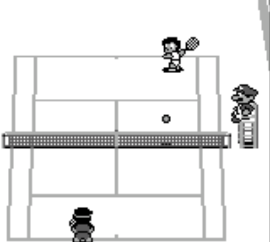
The graphics stay true to the classic Game Boy style, with pixel art that clearly shows players, the court, and the net. While not flashy, the visuals are practical, helping players identify characters and stay aware of the game’s state. Animations are simple but effectively show actions like serving, hitting, and moving around the court.
Progression mainly involves improving your skills rather than unlocking new content. Its replay value comes from trying different difficulty levels or competing against the AI to beat high scores or refine timing. Matches are quick, so replaying multiple times in one session is easy, making it a good choice for brief gaming moments. The straightforward gameplay encourages players to focus on their timing and positioning, which promotes repeated play.
Strategy and Tips
To do well, aim to position your character well and hit the ball with good timing. Pay attention to the opponent’s serve and shot direction to anticipate where the ball will go. Varying your shot placement can force your opponent to move around, opening up chances to score points.
- Start on the easiest difficulty to get comfortable with controls and game rhythm.
- Watch your opponent’s movements to predict their shots and position yourself accordingly.
- Mix up your timing—hitting early or late can disrupt your opponent’s return.
- Use quick, small movements to stay in position instead of overextending for tough shots.
- Practice serving to different parts of the court, especially the corners, to gain an edge.
- Be patient; rushing shots can lead to mistakes. Good timing is key to consistency.
Quick Questions
How do I start a game in Tennis?
Pick your game mode or difficulty, choose your player and opponent, then the match begins right away.
What’s a common mistake for beginners?
Trying to hit the ball too early or too late often results in missed shots or weak returns. Focus on timing your hits properly.
Is Tennis playable on mobile or touch screens?
This game runs in your browser and uses simple controls, so it’s easy to play on touch screens with virtual D-pads or taps. For the best experience, a keyboard or gamepad works well.
Tennis (World) offers a straightforward, engaging tennis experience that harks back to the classic Game Boy days. Its simplicity makes it easy to pick up and enjoy, whether you want quick matches or to sharpen your tennis skills in a nostalgic setting.
Related games: you can also try Alfred Chicken (Japan) and Super Street Basketball 2 (Japan), or browse all other games in the Game Boy category.
How to Play Tennis (World)?
Move your player with the arrow keys to hit the ball back over the net. Score points by outplaying your opponent, and win by reaching the set or match limit.
Game Controls
Arrow keys control movement; a designated button hits the ball.








Comments (0)
No comments yet. Be the first to comment!