Virtual Soccer (Europe)
0 1 0
Virtual Soccer (Europe) is a classic SNES sports game that captures the simple enjoyment of 16-bit era soccer. It’s perfect for players who like fast-paced, arcade-style sports titles, with quick matches and easy controls. As a SNES classic, it brings back nostalgic memories for fans of retro gaming, and now you can play it directly in your browser without any downloads or installations.
Getting Into Virtual Soccer
The main gameplay of Virtual Soccer centers on quick, easy matches where you control a team on a standard soccer field. Matches usually last just a few minutes, making it great for short sessions or casual play. You choose your team and compete against the AI or another player locally. The mechanics are straightforward—passing, shooting, and positioning—so new players can jump right in without feeling overwhelmed.
During a game, you’ll focus on simple offensive and defensive moves. The controls are intuitive, with just a few buttons handling passing, shooting, and moving. It doesn’t have complex tactics or player customization, but the fast-paced gameplay keeps matches engaging. It’s a good choice for quick bursts of play or practicing your timing and coordination over repeated sessions.
Standout Features
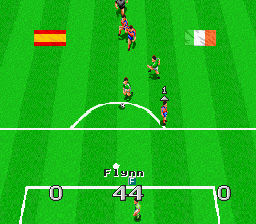
Visually, Virtual Soccer features pixel art that stays true to the SNES style, with clear player sprites and a lively pitch. The animations are sharp enough to keep gameplay smooth, even with several players on screen. The design emphasizes clarity over detail, so you can easily follow the action. Though simple, the visuals evoke a nostalgic feeling that fans of the era will appreciate.
Progressing in Virtual Soccer is straightforward—win matches to beat AI opponents or challenge friends locally. Its replay value comes from quick matches and the ability to jump into another game whenever you want. While it doesn’t include complex modes or tournaments, the simplicity encourages repeated play, helping you improve your reflexes and timing. It’s a quick slice of retro soccer fun that fits well into short gaming sessions.
Strategy and Tips
To get the most out of Virtual Soccer, focus on positioning and timing. Move your players into open spaces to receive passes or intercept opponents. Use quick passes to keep control and set up shots on goal. Keep an eye on the goalkeeper—timing your shots when they are out of position can boost your chances of scoring.
- Make short, precise passes to maintain control during fast breaks.
- Practice timing your shots to beat the goalkeeper, especially when close to the goal.
- Use proper defensive positioning to block passing lanes and shots.
- Take advantage of set pieces, like corner kicks, to create scoring chances.
- Be mindful of your players’ stamina and placement to avoid turnovers or defensive gaps.
Quick Questions
How do I get started with Virtual Soccer?
The game loads instantly in your browser, so you can jump right into a match. Just pick your team and start playing.
What’s a common beginner mistake?
Many newcomers overcommit on offense, leaving their goal open. Focus on balanced play—defend well before attacking.
Can I play Virtual Soccer on mobile or touch devices?
This version works best on desktop browsers, but it can be played on mobile browsers with touch input, though controls may be less precise than with a keyboard or controller.
Virtual Soccer offers a straightforward, fun soccer experience inspired by SNES gameplay. Its quick matches and simple mechanics make it a good pick for fans of retro sports games who want instant entertainment right in their browser.
Related games: you can also try Shougi Saikyou (Japan) and Magical Quest Starring Mickey Mouse, The (Italy), or browse all other games in the SNES category.
How to Play Virtual Soccer (Europe)?
Choose your team and score goals by passing and shooting while controlling your players with simple keyboard commands. Play quick matches against AI or a friend to improve your timing and reflexes.
Game Controls
Arrow keys act as the D-pad; Enter is Start; action buttons are mapped to other keys for passing, shooting, and moving.








Comments (0)
No comments yet. Be the first to comment!