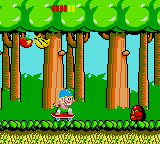
Wonder Boy (Europe)
0 3 0
Wonder Boy (Europe) is a classic Game Gear action-platformer that captures the feel of early 90s portable gaming. If you like straightforward platforming that tests your timing and exploration skills, this game offers a nostalgic experience that runs directly in your browser, no download needed. Its simple gameplay is suitable for both seasoned players and newcomers seeking a retro challenge.
Getting Into Wonder Boy
This game involves navigating a side-scrolling world filled with obstacles, enemies, and platforming challenges. The main gameplay focuses on running, jumping, and avoiding hazards as you move through levels. It doesn’t include complex mechanics or RPG elements; instead, it emphasizes precise timing and movement to complete each stage. Different environments require you to adapt your approach, with some sections demanding quick reflexes or careful planning.
Play sessions usually involve exploring each level for the best route and dodging enemies or pitfalls. While it’s not a long game, it can be tough, especially if you’re aiming for high scores or trying to finish all levels without losing lives. The goal is straightforward: get through each level, learn enemy patterns, and try again if you make a mistake. With no extra modes, your main focus is to progress as far as possible and master jump timing and enemy avoidance.
Standout Features
The visuals of Wonder Boy reflect the limited but charming sprite work typical of Game Gear titles. Colors are bright, and character animations are simple but expressive. The game’s progression is linear, with each level offering new obstacles and environments, encouraging players to improve their skills with each attempt. The straightforward design adds to its replay value, as players often come back to beat their previous best or find hidden routes.
Despite its age, Wonder Boy keeps a clear sense of progression, with each level feeling different. The difficulty ramps up gradually, with early levels acting as tutorials and later sections raising the challenge. Its short length makes it easy to pick up for quick sessions, but mastering the mechanics can motivate players to keep trying. The simple design delivers pure platforming without distractions, making it a good pick for those who enjoy a nostalgic challenge.
Strategy and Tips
Getting started is easy, but paying attention to timing will help you go further. Here are some helpful tips:
- Watch enemy patterns before rushing into sections; patience makes a difference.
- Jump early to avoid falling or missing platforms—timing is key.
- Use small, controlled jumps on tricky platforms instead of large leaps.
- Memorize enemy positions, especially in later levels.
- If you lose lives, think about what caused it and adjust your approach.
- Practice often—repetition sharpens your reflexes and navigation skills.
Quick Questions
How do I get started with Wonder Boy?
Just click to launch the game in your browser; no setup needed. Spend a moment getting familiar with the controls and try a few practice runs.
What’s a common mistake beginners make?
Many rush through levels without paying attention to enemy patterns or jump too late, which often costs lives unnecessarily.
Can Wonder Boy be played on mobile or touch devices?
Yes, since it runs right in your browser, it works on mobile devices with touch controls, though precise timing might take some getting used to on smaller screens.
Wonder Boy is a straightforward yet satisfying arcade platformer that appeals to those who enjoy mastering simple mechanics. Its accessible gameplay and classic style make it a nice choice for anyone craving a nostalgic, challenging experience right in their browser.
Related games: you can also try Crystal Warriors (USA, Europe) and Nazo Puyo (Japan), or browse all other games in the Game Gear category.
How to Play Wonder Boy (Europe)?
Navigate through side-scrolling levels by running and jumping, avoiding enemies and hazards to reach the end of each stage. Learn enemy patterns and improve timing to progress further and beat your best scores.
Game Controls
Arrow keys control movement; action buttons are mapped to keyboard keys for jumping and attacking.
You may be interested in:
-
 Game Gear
♥ 1
Wonder Boy (Japan)
Game Gear
♥ 1
Wonder Boy (Japan) -
 Game Gear
♥ 4
Wonder Boy – The Dragon’s Trap (USA, Europe)
Game Gear
♥ 4
Wonder Boy – The Dragon’s Trap (USA, Europe) -
 Game Gear
♥ 1
Wolfchild (USA, Europe)
Game Gear
♥ 1
Wolfchild (USA, Europe) -
 Game Gear
♥ 1
Wizard Pinball (Europe)
Game Gear
♥ 1
Wizard Pinball (Europe) -
 Game Gear
♥ 1
Winter Olympics – Lillehammer ’94 (USA, Europe) (En,Fr,De,Es,It,Pt,Sv,No)
Game Gear
♥ 1
Winter Olympics – Lillehammer ’94 (USA, Europe) (En,Fr,De,Es,It,Pt,Sv,No) -
 Game Gear
♥ 1
Winter Olympics – Lillehammer ’94 (Japan) (En,Fr,De,Es,It,Pt,Sv,No)
Game Gear
♥ 1
Winter Olympics – Lillehammer ’94 (Japan) (En,Fr,De,Es,It,Pt,Sv,No) -
 Game Gear
♥ 1
Wimbledon (Japan, Europe)
Game Gear
♥ 1
Wimbledon (Japan, Europe) -
 Game Gear
♥ 1
Wheel of Fortune (USA, Europe)
Game Gear
♥ 1
Wheel of Fortune (USA, Europe)
Comments (0)
No comments yet. Be the first to comment!