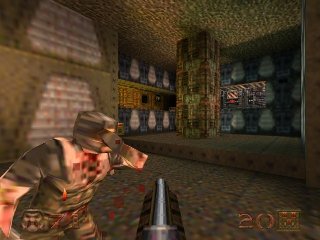
Quake 64 (USA)
0 11 1
Quake 64 (USA) is a classic Nintendo 64 game emulated in the browser, bringing the intense first-person shooter experience directly to your screen without any downloads or installations. This game appeals to fans of retro shooters and those who enjoy fast-paced, straightforward gameplay. As a port of the original Quake, it captures the core mechanics and atmosphere of the PC classic, now optimized for the Nintendo 64’s unique controls and hardware. If you remember the thrill of navigating dark corridors and blasting enemies with a variety of weapons, Quake 64 offers a nostalgic yet fresh experience playable right in your browser.
Getting Into Quake 64
The core gameplay of Quake 64 revolves around exploring maze-like levels filled with enemies, secrets, and weapons. Players typically start with a basic armament and must scavenge for better guns, ammunition, and health packs as they progress. The game’s movement is fast and responsive, encouraging quick reflexes and precise aiming. The game features a single-player campaign with a series of levels that require solving simple navigation puzzles and combat encounters to advance. The sessions tend to be intense and short, often lasting 10-20 minutes per level, making it accessible for quick play sessions or longer marathons for dedicated fans.
Multiplayer modes are not part of this version, so the focus remains on single-player combat and exploration. The gameplay loop involves moving through each level, clearing out enemies, collecting items, and finding the exit. The game’s difficulty scales with level progression, demanding both strategic weapon use and awareness of enemy placement. The straightforward mechanics make it easy to pick up but hard to master, especially on higher difficulty settings. Overall, Quake 64 offers a classic FPS experience that emphasizes speed, reflexes, and map knowledge.
Standout Features
Visually, Quake 64 maintains the gritty, dark aesthetic of the original PC game, with low-poly models and simple textures that evoke the console’s era. The game’s atmospheric sound design, featuring haunting ambient noises and weapon effects, enhances the feeling of being in a hostile, alien environment. Progression is tied to completing levels, with each new stage introducing slightly more complex layouts and enemy placements, encouraging replay to master each map. The game’s replay value comes from its challenge—players often revisit levels to improve speed runs or discover hidden secrets, which are plentiful in the level design.
Despite limited graphical fidelity, Quake 64 manages to preserve the tense and immersive experience of the original. The variety of weapons and the strategic importance of conserving ammo add layers of depth to the gameplay. The game’s straightforward design makes it easy to pick up, but mastering the enemy patterns and navigating the levels efficiently can take time. This combination of simple yet challenging gameplay encourages repeated attempts and experimentation, keeping players engaged even after completing the main campaign.
Strategy and Tips
If you’re new to Quake 64, focusing on movement and target tracking will improve your survival chances. Keep these tips in mind:
- Conserve your ammunition by using your pistol or shotgun on weaker enemies to save powerful weapons for tougher foes.
- Learn level layouts to reduce wandering and find health and ammo pickups quickly.
- Aim for headshots when possible to dispatch enemies faster and conserve resources.
- Use environmental cover during firefights to avoid taking unnecessary damage.
- Try to keep moving constantly to make yourself a harder target for enemies.
- Explore each level thoroughly for secrets and power-ups that can make subsequent runs easier.
Quick Questions
How do I get started if I’m new to Quake 64?
Start with the first level to familiarize yourself with movement, controls, and enemy placement before tackling more difficult stages.
What is the most common mistake beginners make?
Many players waste ammo by firing at distant enemies instead of conserving resources for tougher encounters and secret areas.
Can I play Quake 64 on mobile or touch devices?
Yes, since it runs directly in your browser, you can play Quake 64 on mobile devices with a touchscreen, but a mouse or controller will provide a better experience for aiming and movement.
This browser-based version of Quake 64 offers a faithful and accessible way to enjoy a beloved FPS classic. Its straightforward gameplay and atmospheric design make it a solid choice for both newcomers and longtime fans of the genre.
Related games: you can also try Perfect Dark (Japan) and Gourmet Guy's 1000IQ Food Quiz, or browse all other games in the Nintendo 64 category.
How to Play Quake 64 (USA)?
Explore levels, defeat enemies, find weapons and secrets, and reach the exit to progress through each stage. Use speed and strategy to survive and complete the game.
Game Controls
Arrow keys move; space or designated keys fire and interact; other keys handle weapon switching and actions.
You may be interested in:
-
 Nintendo 64
♥ 1
Robotron 64 (Europe)
Nintendo 64
♥ 1
Robotron 64 (Europe) -
 Nintendo 64
♥ 3
Robotech – Crystal Dreams (USA) (Proto)
Nintendo 64
♥ 3
Robotech – Crystal Dreams (USA) (Proto) -
 Nintendo 64
♥ 2
Robot Poncots 64 – 7tsu no Umi no Caramel (Japan)
Nintendo 64
♥ 2
Robot Poncots 64 – 7tsu no Umi no Caramel (Japan) -
 Nintendo 64
♥ 1
Roadsters (USA) (En,Fr,Es)
Nintendo 64
♥ 1
Roadsters (USA) (En,Fr,Es) -
 Nintendo 64
♥ 6
Roadsters (Europe) (En,Fr,De,Es,It,Nl)
Nintendo 64
♥ 6
Roadsters (Europe) (En,Fr,De,Es,It,Nl) -
 Nintendo 64
♥ 17
Road Rash 64 (USA)
Nintendo 64
♥ 17
Road Rash 64 (USA) -
 Nintendo 64
♥ 3
Road Rash 64 (Europe)
Nintendo 64
♥ 3
Road Rash 64 (Europe) -
 Nintendo 64
♥ 34
Return to Yoshi’s Island 64 DEMO
Nintendo 64
♥ 34
Return to Yoshi’s Island 64 DEMO
Comments (0)
No comments yet. Be the first to comment!