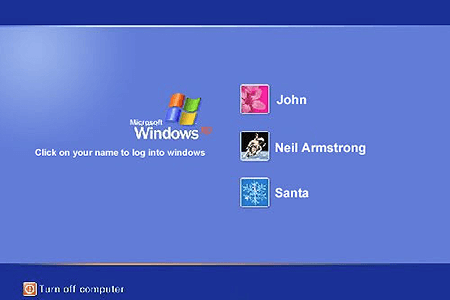
Windows XP Parody
0 50 50
Windows XP Parody is a funny and nostalgic flash game that lets players revisit the quirks of the classic Windows XP operating system in a playful way. It uses familiar visuals and sounds from the OS, combined with lighthearted gameplay that appeals to both longtime fans of Windows and casual gamers looking for a quick distraction. The game turns the nostalgic interface into a lively, sometimes absurd experience, making it a fun choice for anyone wanting to remember the good old days of desktop computing—all within their browser.
As a free browser game, Windows XP Parody offers an easy way to enjoy a piece of tech history with a humorous twist. Its simple mechanics make it accessible for all ages, whether you’re a Windows veteran or just curious about what the game has to offer. Playing on your preferred device, you can explore the whimsical world of Windows XP in a way that’s both amusing and engaging. It captures the feel of nostalgia while providing a light and enjoyable experience for short gaming sessions or quick breaks.
Windows XP Parody: Gameplay Overview
The main gameplay involves navigating a stylized version of the classic Windows desktop. Players click on familiar icons, menus, and system sounds, but with a humorous, exaggerated touch. Tasks might include completing simple puzzles, exploring the interface, or reacting to unexpected and amusing behaviors. Controls are straightforward, making it easy to jump right in without a steep learning curve.
What makes Windows XP Parody stand out is its focus on parody and satire. As you click around, you encounter exaggerated system errors, funny pop-up messages, and quirky animations. You might try avoiding fake virus alerts or managing exaggerated resource pop-ups, all designed to mimic the old Windows XP experience with a playful twist. The game encourages experimentation, discovering hidden surprises, and enjoying the humorous take on a familiar system. It’s like a quirky walk down memory lane with a humorous edge.
Modes, Levels and Progression
While it doesn’t have traditional levels with increasing difficulty, Windows XP Parody offers different scenarios, mini-games, and challenges that imitate various aspects of Windows XP. These often get a bit more complex, requiring you to think differently or solve puzzles that resemble system troubleshooting. Progressing through the game encourages exploration, with new surprises unlocked as you go deeper into its parody universe.
Besides the main experience, the game might include unlockable content, funny Easter eggs, or alternate mini-games that add variety and replay value. Whether it’s navigating a desktop full of pop-ups or managing a malfunctioning system, each playthrough offers something a little different. The playful design and unexpected reactions keep it fresh enough to revisit. Overall, it’s a lighthearted way to enjoy the nostalgia of Windows XP while offering new surprises for casual players and fans of the era alike.
Winning Strategies
To get more out of Windows XP Parody, try a few simple tips:
- Click around on icons and pop-ups to discover hidden jokes or surprises scattered across the interface.
- Watch how the system reacts—some challenges need quick reflexes or clever thinking to avoid errors or glitches.
- Experiment with different approaches when solving puzzles or challenges; sometimes unconventional methods work better.
- Explore all menus and settings—you might find amusing surprises or unlock new scenarios.
- Come back after updates or new content are added, as developers often include fresh features or hidden secrets.
- Enjoy the humor and satire—there’s usually a witty comment or joke behind every system response.
- If you get stuck, refreshing the page can trigger new events or reactions that might help you progress or just give you more laughs.
Common Questions About Windows XP Parody
Does the difficulty level change as I explore more of the game?
The game is mainly a casual experience, with its humor and puzzles staying light and accessible. Some tasks might need quick thinking or a bit of creativity, but overall, it remains simple enough for most players.
Are there different modes or scenarios in the game?
Yes, there are various scenarios, mini-games, and humorous challenges that imitate different parts of Windows XP. They add variety and encourage exploring different aspects of the parody universe.
Can I play Windows XP Parody offline or on mobile devices?
Since it’s a browser-based flash game, you’ll need an internet connection to play. It doesn’t usually work offline or on mobile devices unless your browser can run flash content, which is becoming less common. It’s best enjoyed on a desktop or laptop with internet access for a quick, amusing experience.
Playing this parody in your browser offers a fun, nostalgic look back at Windows XP with a humorous twist. Whether you remember the era well or are new to it, the game provides a lighthearted way to enjoy the quirks and charm of that classic operating system in a playful format.
Related games: you can also try Bloons and El Chicken Fantastico, or browse all other games in the Flash category.
How to Play Windows XP Parody?
Click on icons, menus, and pop-ups to complete tasks, solve puzzles, and explore humorous Windows XP scenarios. Discover surprises and enjoy the parody of the classic OS in a playful, lighthearted way.
Game Controls
Use mouse to click and interact with icons and menus.
You may be interested in:
-
 Flash
♥ 0
Nick Jr. Jukebox
Flash
♥ 0
Nick Jr. Jukebox -
 Flash
♥ 0
Go Diego Go: Rainforest Adventure
Flash
♥ 0
Go Diego Go: Rainforest Adventure -
 Flash
♥ 0
Dora’s Star Mountain Mini-Golf!
Flash
♥ 0
Dora’s Star Mountain Mini-Golf! -
 Flash
♥ 0
Dora the Explorer: Say It Two Ways
Flash
♥ 0
Dora the Explorer: Say It Two Ways -
 Flash
♥ 0
Mr. Meaty Treasures Of The Deep
Flash
♥ 0
Mr. Meaty Treasures Of The Deep -
 Flash
♥ 0
SpongeBob’s Pizza Toss!
Flash
♥ 0
SpongeBob’s Pizza Toss! -
 Flash
♥ 0
SpongeBob Squarepants: Squeaky Boot Blurbs
Flash
♥ 0
SpongeBob Squarepants: Squeaky Boot Blurbs -
 Flash
♥ 0
SpongeBob: Coloring Book
Flash
♥ 0
SpongeBob: Coloring Book
Comments (0)
No comments yet. Be the first to comment!