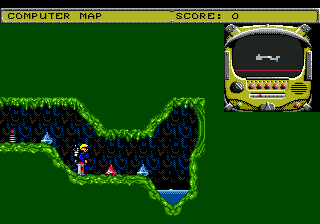
Slime World (Japan)
0 1 0
Slime World (Japan) is a classic Genesis game that mixes action and exploration, giving players a taste of retro platforming. Originally released during the Genesis era, it stands out for its straightforward gameplay and nostalgic look, making it a favorite among fans of 16-bit games. The Japanese version might have Japanese text, so players should keep that in mind if they’re not familiar with the language.
Slime World: Gameplay Overview
The game follows a slime character moving through different levels filled with obstacles, enemies, and puzzles. Success depends on precise movement, well-timed jumps, and avoiding hazards that can drain health or end the game. While it focuses on action, it also includes exploration and platforming challenges. Players need to learn enemy patterns and level layouts to move forward efficiently, making each run a mix of quick reflexes and strategic thinking.
The main goal is to clear levels by defeating enemies, avoiding dangers, collecting items, and reaching the exit. Although it doesn’t have complex combat, it requires good timing and awareness of your surroundings. The design encourages trial-and-error learning, typical of many early action-adventure games, with mastery of each stage helping you progress.
Modes, Levels and Progression
This Genesis game follows a linear path through a series of levels, each more challenging than the last. The stages differ in design, requiring players to adapt as they face new enemies and obstacles. There aren’t multiple modes; it’s a straightforward adventure that rewards repeated attempts to improve. Progress mainly means moving through levels, with the difficulty gradually increasing as players get better at platforming and avoiding hazards.
Replaying levels can help sharpen your skills and improve your speed. The game’s structure is typical for its time, emphasizing skill development and recognizing patterns. As you finish one level, you unlock the next, gradually facing more complex challenges.
Winning Strategies
Getting through Slime World well relies on timing and understanding enemy behavior. Here are some handy tips:
- Watch enemy movements carefully to find safe moments to pass.
- Pick up available power-ups to boost your health or gain temporary advantages.
- Practice your jumps and movement to be more accurate during tricky parts.
- Take your time exploring each level— rushing often leads to mistakes.
- Use environmental features like platforms and cover to stay safe.
- Be patient; many levels need multiple tries to learn the best routes and timing.
Common Questions About Slime World
How does the difficulty change as I go?
The game gets tougher with each level, introducing more complex enemy patterns and hazards. Expect to face harder challenges as you progress, so practicing and learning each stage is key.
Are there multiple levels or stages?
Yes, the game has a series of levels that you complete one after another. Each stage tests different skills, and revisiting earlier levels can help you improve overall performance.
How long does it usually take to finish?
The time depends on your skill, but most players spend several sessions figuring out each level and enemy pattern. Since trial-and-error is part of the game, expect to spend some time refining your approach with multiple attempts.
Playing Slime World on this browser emulator offers a genuine way to enjoy this Genesis classic. You can experience its action and exploration without needing to download anything. Its simple design and nostalgic feel make it a good pick for fans of retro platformers and those curious about lesser-known titles from the Genesis library.
Related games: you can also try Jack Nicklaus' Power Challenge Golf (USA, Europe) and Shadow the Hedgehog in Sonic the Hedgehog, or browse all other games in the Genesis category.
How to Play Slime World (Japan)?
Move your slime through levels, avoid enemies and hazards, collect items, and reach the exit. Practice timing and movement to progress and beat each stage.
Game Controls
Arrow keys control movement; action buttons are mapped to keyboard keys for jumping and interacting.







Comments (0)
No comments yet. Be the first to comment!