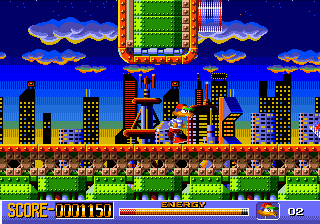
Socket (USA)
0 1 0
Socket (USA) is a classic Genesis platformer that offers simple, fast-paced gameplay perfect for quick sessions and nostalgic fun. If you enjoy jumping challenges and straightforward design, this game delivers a solid dose of retro excitement that runs right in your browser, no downloads necessary. Its style captures the feel of the early 90s, making it a good pick for fans of that era’s platformers looking for a faithful experience on modern devices.
Getting Into Socket
This game centers on guiding a character through side-scrolling levels filled with obstacles and enemies. The main goal is to jump over gaps, dodge hazards, and reach the end of each stage. It doesn’t include complex power-ups or branching paths, but it does require good timing and precision. Mastering its controls pays off, as each level gets tougher, pushing you to improve your skills.
Sessions tend to be quick, ideal for short bursts of play. As a platformer, your focus will be on learning each level’s layout and timing your jumps just right. There’s no multiplayer mode, so the challenge is to beat your own scores or complete levels more efficiently. Expect to replay sections to learn enemy movements and level design, which makes trying again more satisfying than frustrating.
Standout Features
Graphically, Socket echoes early Genesis games with bright, pixel-perfect sprites and simple backgrounds that give it an authentic look. The visuals are clear and easy to follow, helping you understand each stage’s layout quickly. Though it doesn’t have fancy animations, the clean design keeps gameplay smooth and responsive.
Progression is straightforward: finish each level to move forward, with difficulty gradually increasing. The replay value comes from trying to beat your best times or scores and perfecting your jumps and timing. Since the game is short and focused, it encourages skill improvement over multiple sessions, making it perfect for quick, repeatable play in your browser.
Strategy and Tips
To improve at Socket, focus on precise timing and recognizing enemy patterns. Patience and practice will help you get familiar with each level’s layout and avoid unnecessary mistakes.
- Take a moment to study each level’s layout before rushing through.
- Get comfortable with the timing of your jumps to prevent falls or hits.
- Prioritize safety over speed—rushing can lead to errors.
- Replay levels to improve your score or finish faster, aiming for smooth movements.
- Use trial and error to memorize tricky sections, then move confidently.
- Don’t be discouraged by setbacks—each attempt helps you get better.
Quick Questions
How do I start playing Socket?
The game loads directly in your browser; just click to begin and use your keyboard to control your character.
What’s a common mistake for beginners?
Many jump into levels without studying enemy patterns or the layout, which often leads to unnecessary falls or hits.
Can I play it on mobile or touch devices?
Because it runs in a browser, it works on mobile, but precise timing might be trickier without a keyboard or controller.
This Genesis classic offers a straightforward, nostalgic platforming experience that’s easy to pick up and enjoy in short sessions. Its simple mechanics and pixel art make it a good choice for anyone looking for quick, satisfying gameplay—right in your browser with no fuss or downloads needed.
Related games: you can also try La Russa Baseball 95 (USA, Australia) and Fantasia (World), or browse all other games in the Genesis category.
How to Play Socket (USA)?
Guide your character through side-scrolling levels by jumping over gaps and avoiding hazards to reach the end, improving your timing and skills with each attempt.
Game Controls
Arrow keys control movement; jump and action buttons are mapped to keyboard keys.






Comments (0)
No comments yet. Be the first to comment!