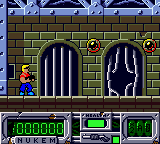
Duke Nukem (Europe) (En,Fr,De,Es,It)
Play Duke Nukem (Europe) (En,Fr,De,Es,It)
0 1 0
Duke Nukem (Europe) (En,Fr,De,Es,It) is a classic Game Boy Color action-platformer that captures the gritty, over-the-top vibe of its larger console counterparts in a portable format. This game offers a straightforward side-scrolling shooting experience wrapped in a pixelated, colorful aesthetic that screams late ’90s gaming. It’s a piece of handheld nostalgia that provides quick bursts of intense gameplay, ideal for short sessions or when you’re craving some retro action on the go—or, in this case, right in your browser.
Read more about Duke Nukem (Europe) (En,Fr,De,Es,It)Show less
Why Duke Nukem Is Worth Playing
What makes this Game Boy Color version stand out isn’t just its faithful attempt at translating the franchise’s signature attitude. It’s how it manages to condense the frenetic energy of the original into a manageable, bite-sized experience. The visuals, though limited by the handheld’s hardware, do a decent job of capturing the comic-book style and exaggerated character designs fans will recognize. The sound design might be simple, but the chirpy sound effects and catchy tunes set a lighthearted tone that balances the game’s action-packed moments.
The core gameplay involves running, jumping, and shooting through levels filled with enemies and obstacles. Its straightforward design makes it accessible for newcomers, but mastering the timing and recognizing enemy patterns keeps things interesting for experienced players. Its simplicity means it’s easy to pick up and play for a few minutes, yet enough challenge exists to keep players coming back, especially those who enjoy the classic platformer feel with a bit of comic bravado. It’s a well-crafted package that respects the hardware’s limits while offering enough action to hold your attention.
Tips to Get Ahead
Getting the most out of Duke Nukem involves a few simple strategies. Here are some practical tips to help you progress more smoothly:
- Watch enemy movements — observe how they attack and move to avoid damage.
- Save your ammo — don’t waste shots on weak enemies; keep your resources for tougher foes.
- Jump carefully — timing your jumps is key to avoiding hazards and reaching higher platforms.
- Familiarize yourself with the levels — knowing the layout helps you avoid backtracking and find secrets.
- Keep moving — standing still makes you an easy target; stay active and use cover wisely.
- Practice patience — some sections need precise timing; don’t rush, plan your moves carefully.
Things to Know Before You Start
How long does a typical game session last?
Most levels can be finished in a few minutes, making it perfect for quick play sessions or short breaks.
Is Duke Nukem suitable for casual players?
Yes, its simple controls and straightforward design make it accessible, though the difficulty gradually ramps up, rewarding players who learn enemy patterns.
What about the difficulty level?
The game offers a moderate challenge typical of late ’90s platformers. Expect to die a few times, especially on tougher sections, but it’s not overly harsh for dedicated players.
Is this a long adventure?
It’s more of a pick-up-and-play style experience, with each level designed to be completed quickly. It’s great for casual gaming but won’t take hours to finish in one sitting.
Jump into this browser-based version of Duke Nukem and see how well you handle its fast-paced action. It’s a compact piece of the franchise’s signature attitude and gameplay—perfect for fans of classic platformers who want a nostalgic challenge without the hassle of downloads or installations.
Related games: you can also try Crazy Bikers (Europe) and Donkey Kong 5 – The Journey of Over Time and Space (Unlicensed, English), or browse all other games in the Game Boy Color category.
How to Play Duke Nukem (Europe) (En,Fr,De,Es,It)?
Move, jump, and shoot through levels to defeat enemies and reach the end. Avoid hazards, conserve ammo, and learn enemy patterns to progress efficiently.
Game Controls
Arrow keys control movement; action buttons are mapped to keyboard keys for jumping and shooting.
Related Retro Games
 ♥ 43Zook Hero Z
 ♥ 1Zok Zok Heroes (Japan)
 ♥ 1Zoids – Shirogane no Juukishin Liger Zero (Japan)
 ♥ 1Zoids – Jashin Fukkatsu! Genobreaker Hen (Japan)
 ♥ 2Zoboomafoo – Playtime in Zobooland (USA)
 ♥ 1Zidane Football Generation (Europe) (En,Fr,De,Es,It)
 ♥ 1Zen-Nihon Shounen Soccer Taikai – Mezase Nihon Ichi! (Japan)
 ♥ 1Zebco Fishing! (USA)