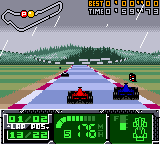
F1 World Grand Prix II for Game Boy Color (Europe) (En,Fr,De,Es)
Play F1 World Grand Prix II for Game Boy Color (Europe) (En,Fr,De,Es)
0 1 0
F1 World Grand Prix II for Game Boy Color (Europe) (En,Fr,De,Es) is a racing game that captures the excitement and precision of Formula 1 racing within the compact, pixelated world of the Game Boy Color. As a classic from the handheld’s library, it gives players the chance to experience high-speed circuits and competitive racing on the go, wrapped in the nostalgic charm of late 90s handheld gaming. Its simple controls and straightforward gameplay make it accessible yet difficult enough to keep things interesting for quick sessions or longer playthroughs. The game’s vibrant visuals and energetic sound design evoke the thrill of F1 races, even with the platform’s limitations.
Read more about F1 World Grand Prix II for Game Boy Color (Europe) (En,Fr,De,Es)Show less
Step Into the World of F1 World Grand Prix II for Game Boy Color
From the moment you start playing, the atmosphere is all about speed and competition. The visuals are colorful but limited by the Game Boy Color’s pixel art, with detailed tracks and easily recognizable car sprites that give a sense of motion. The circuits are designed to be easy to follow, with sharp turns and long straightaways that test your reflexes. Sound effects mimic engine roars and tire squeals, adding to the immersion and keeping you engaged during intense races. The menus are simple but give an authentic feel, resembling real F1 timing screens and lap counters.
How the Gameplay Hooks You
The main gameplay loop involves choosing a driver and racing through various circuits, each with its own challenges and quirks. Races are quick, keeping adrenaline high without dragging on. As you advance, the game introduces new tracks and difficulty levels, encouraging you to sharpen your skills and improve timing. The mechanics focus on precise steering and timing, rewarding players who pay attention to each circuit’s details. Its straightforward style makes it easy to pick up but tough to master, so you’ll find yourself trying again and again to shave seconds off your lap times and improve your standings.
Pro Tips for F1 World Grand Prix II for Game Boy Color
Getting the most out of the game depends on paying attention to detail and planning your approach around each circuit. Here are some tips:
- Learn each turn well to cut down lap times and avoid crashes.
- Use the brakes carefully on straight sections to keep your speed without losing control.
- Check out the track layout before each race to plan your racing line.
- Adjust your strategy for different weather conditions or circuit features, if the game allows.
- Practice regularly to get familiar with each track’s nuances and improve your reflexes.
- Start races smoothly; a good launch can put you ahead early on.
Frequently Asked Questions
How long does a typical race take?
Most races last just a few minutes, making it easy to play in short bursts or fit into a busy schedule.
Does the game get repetitive after a while?
While the core gameplay is straightforward, mastering different circuits and improving lap times keeps things interesting over time.
Is this game suitable for younger players or beginners?
Yes. Its simple controls and accessible gameplay make it a good choice for newcomers or younger players interested in racing on the Game Boy Color.
F1 World Grand Prix II for Game Boy Color offers a compact racing experience that balances challenge with accessibility. Its pixel art, authentic sound effects, and straightforward gameplay make it a nice find for fans of vintage handheld racing titles. Playing it on this browser-based emulator keeps the nostalgic vibe alive, giving quick access to this classic whenever you want a racing fix.Related games: you can also try Dragon Quest Monsters 2 – Maruta no Fushigi na Kagi – Ruka no Tabidachi (Japan) and Dragon Tales – Dragon Adventures (USA), or browse all other games in the Game Boy Color category.
How to Play F1 World Grand Prix II for Game Boy Color (Europe) (En,Fr,De,Es)?
Choose a driver and race on different circuits, steering carefully to complete laps quickly and avoid crashes. Improve your times and unlock new tracks by mastering each course’s turns and straights.
Game Controls
Arrow keys control steering; other keys handle acceleration, braking, and gear changes.
Related Retro Games
 ♥ 43Zook Hero Z
 ♥ 1Zok Zok Heroes (Japan)
 ♥ 1Zoids – Shirogane no Juukishin Liger Zero (Japan)
 ♥ 1Zoids – Jashin Fukkatsu! Genobreaker Hen (Japan)
 ♥ 2Zoboomafoo – Playtime in Zobooland (USA)
 ♥ 1Zidane Football Generation (Europe) (En,Fr,De,Es,It)
 ♥ 1Zen-Nihon Shounen Soccer Taikai – Mezase Nihon Ichi! (Japan)
 ♥ 1Zebco Fishing! (USA)