Mario’s Candy Quest
Play Mario’s Candy Quest
0 2 0
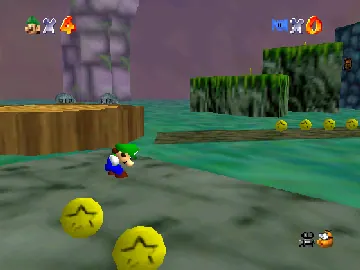
Mario’s Candy Quest is a platform-style puzzle game that was originally made for the Nintendo 64 and is now playable right in your browser as an emulated classic. Its bright, playful look and simple mechanics make it a good pick for anyone looking for a nostalgic challenge from that era. The game mixes puzzle-solving with a light adventure vibe, focusing on pattern recognition and timing to get through each level.
Read more about Mario’s Candy QuestShow less
Mario’s Candy Quest: Gameplay Overview
The main idea in Mario’s Candy Quest is to move through levels filled with candies, obstacles, and interactive items. You control a character that looks similar to Mario, aiming to collect candies and reach the end of each stage before time runs out. Precise movement and timing are important, so planning your route carefully helps you avoid hazards and gather as many candies as possible.
The levels are designed with multiple paths, encouraging some exploration and replay. As you go along, the difficulty ramps up a little with more complex layouts and extra obstacles, but the core mechanics stay the same. The controls respond well, making it easy to pick up but still offering a challenge when trying for high scores or perfect runs.
Modes, Levels and Progression
Mario’s Candy Quest is a single-player game with a series of levels that get a little tougher as you go. Each stage has different layouts, some with moving platforms, timed switches, or clusters of candies to collect. There aren’t multiple modes, but the variation in level design means you need to adapt your approach as you progress.
You advance by finishing levels within the time limit and collecting enough candies. There’s no complex story or unlockables, but replaying levels to beat your high scores or improve your times keeps things interesting. It’s simple enough for players of many ages, though mastering the timing adds a nice challenge even for experienced gamers.
Winning Strategies
Focusing on quick, efficient routes and smart decision-making helps you do well in Mario’s Candy Quest.
- Think about your path before you start moving to save time and avoid backtracking.
- Gather candies in safe spots first, then tackle the more dangerous areas.
- Use timing carefully to dodge moving obstacles and timed switches.
- Learn level layouts so you can remember the best routes and finish faster.
- Don’t rush unnecessarily—taking your time can prevent mistakes and falls.
- Try to get all candies in each level to boost your score and earn extra points.
Common Questions About Mario’s Candy Quest
How does difficulty change as I go along?
The game introduces more complicated layouts and new hazards gradually, so you’ll need better timing and planning as you progress, but the basic mechanics stay the same.
Are there different modes, or just one straightforward experience?
It’s a single mode focused on completing levels and aiming for high scores, without different difficulty settings or multiplayer options.
How long does a typical session take?
Most levels can be finished in a few minutes, depending on your skill. Playing for high scores or perfect runs can stretch out your time, making replaying quite rewarding for puzzle and platform fans.
Playing Mario’s Candy Quest in your browser keeps things simple but fun, with a style inspired by the classic Nintendo 64 platformers. Its easy mechanics and variety of levels make it good for casual players as well as those looking for a bit of a challenge, all without needing any downloads or extra setup.
Related games: you can also try Mario Kart 64 – Amped Up v2.94 and Banjo-Kazooie Cheato's Challenges v1.0, or browse all other games in the Nintendo 64 category.
How to Play Mario’s Candy Quest?
Move through levels collecting candies and avoiding obstacles before time runs out. Plan your route, use timing to dodge hazards, and try to finish quickly for a high score.
Game Controls
Arrow keys control movement; other keys handle jumping and actions.







