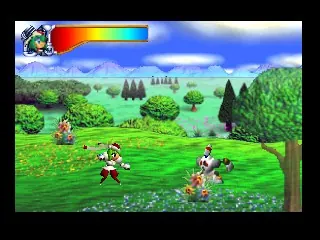
Mischief Makers (USA) (Rev A)
Play Mischief Makers (USA) (Rev A)
0 4 0
Mischief Makers (USA) (Rev A) is a classic Nintendo 64 game that runs right in your browser. It offers lively platforming action that fans of colorful, action-filled titles often enjoy. Originally made for the Nintendo 64 console, this game combines unique mechanics with charming graphics, making it a great pick for anyone looking to enjoy some retro gaming without installing anything. Its simple gameplay and whimsical style make it easy for newcomers to pick up, while still being fun for those who remember the era.
Read more about Mischief Makers (USA) (Rev A)Show less
Getting Into Mischief Makers
The main idea in Mischief Makers is controlling a character who uses a special grab-and-throw move to move through levels and take out enemies. The game is made up of several stages, each with a mix of platforming sections, puzzles, and enemy encounters. Players usually progress by completing objectives like rescuing characters or collecting items. Success depends on good timing and clever use of the grab mechanic.
During play, you’ll switch between exploring levels and getting comfortable with the game’s controls. Levels have multiple routes and hidden areas, so exploring can be rewarding. Boss fights test how well you’ve learned the mechanics, making each attempt a mix of trial, error, and improvement. Since it’s a single-player game, most sessions involve trying to finish levels quickly or finding secrets to boost your score.
Standout Features
The visuals in Mischief Makers feature colorful, cartoon-style graphics typical of the Nintendo 64, with expressive characters and lively backgrounds. The style emphasizes clarity and charm, making it easy to follow the action. Moving through levels is straightforward but layered, encouraging players to revisit stages to find hidden spots or improve their runs.
Replay value comes from the varied level designs and the challenge of mastering the mechanics. Finishing levels quickly and collecting all items can unlock secrets, and trying to beat your scores gives you a reason to replay. The simple structure makes it easy to jump in for quick sessions, but the game’s depth keeps things interesting for those wanting to perfect their skills or explore every part of the stages.
Strategy and Tips
Getting comfortable with the grab-and-throw move is key for smooth progress. Focus on timing your grabs to avoid enemies and solve puzzles faster. Try different throwing angles and distances to reach tricky spots.
- Take your time to learn each level’s layout before rushing through it.
- Use the environment—platforms, walls, and objects—to your advantage when throwing or dodging enemies.
- Watch enemy patterns; many can be defeated or bypassed by smart throws.
- Practice your grab timing to avoid mistakes, especially during boss fights or tricky sections.
- Revisit levels to find hidden items or improve your time for higher scores.
Quick Questions
How do I start playing Mischief Makers?
The game loads instantly on this site; just pick it from the menu and play in your browser without any downloads.
What’s a common mistake beginners make?
Many new players try rushing through levels without mastering the grab move, which can lead to mistakes and frustration.
Can I play Mischief Makers on mobile or touch devices?
While it works in your browser, it’s designed for keyboard controls. Playing on mobile or a touchscreen might be less comfortable but still doable with some adjustments.
Mischief Makers offers lively, straightforward platforming fun right in your browser. Its playful mechanics and colorful visuals make it a solid choice for anyone interested in classic Nintendo 64 adventures.Related games: you can also try Excitebike 64 (USA) and Mega Microlevels, or browse all other games in the Nintendo 64 category.
How to Play Mischief Makers (USA) (Rev A)?
Control the character to explore levels, use grab-and-throw moves to defeat enemies and solve puzzles, and complete objectives like rescuing characters or collecting items to progress.
Game Controls
Arrow keys control movement; action buttons are mapped to keyboard keys for grabbing, throwing, and interacting.







