Pop’n Music GB – Disney Tunes (Japan)
Play Pop’n Music GB – Disney Tunes (Japan)
0 1 0
Pop’n Music GB – Disney Tunes (Japan) is a music rhythm game for the Game Boy Color that combines Disney melodies with gameplay mechanics typical of handheld titles from its time. As part of the pop’n music series, it offers players a selection of familiar tunes paired with a rhythm-based challenge designed for quick sessions. The game offers nostalgic vibes rooted in the portable, accessible format of the Game Boy Color, appealing to fans of Disney and rhythm games looking for a casual experience that still feels rewarding.
Read more about Pop’n Music GB – Disney Tunes (Japan)Show less
Pop’n Music GB – Disney Tunes: Gameplay Overview
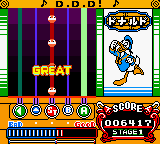
The game involves pressing buttons in time with Disney tunes. You see notes scrolling along with melodies, and the goal is to press the right button when these notes reach a specific zone. The main focus is on recognizing rhythm and reacting quickly, making the gameplay straightforward and suitable for players of all ages. The visuals are simple but clear, showing notes against a plain background, with the emphasis on timing and precision.
This rhythm game is designed for short play sessions, with each song lasting just a few minutes. The interface is easy to understand, with cues that help you anticipate upcoming notes. It encourages trying again to improve your timing and scores, fitting both casual listening and more dedicated play. Running smoothly on the Game Boy Color, it features a clean, pixel-art look that complements the music and gameplay.
Modes, Levels and Progression
Pop’n Music GB – Disney Tunes offers a playlist of Disney songs with different difficulty levels. It doesn’t include complex modes or branching paths but gradually increases challenge as you try to perfect your timing on more complicated melodies. The selection covers well-known Disney classics, appealing to fans of the soundtracks, with difficulty rising alongside the complexity of the rhythmic patterns.
You can replay songs to improve scores or take on tougher arrangements, creating a sense of progress through practice. Without elaborate story modes or unlockables, the game’s depth comes from honing your timing and accuracy. Its simplicity makes it easy to pick up, but mastering the rhythm at higher levels can still be quite satisfying for dedicated players.
Winning Strategies
Listen carefully to each melody before trying to hit the notes. Knowing the tunes can help you anticipate patterns and improve your timing.
- Practice each song to recognize rhythmic patterns and build muscle memory.
- Maintain a consistent rhythm; rushing or delaying can hurt your accuracy.
- If the game allows, tweak your timing during play to improve your performance.
- Start with easier songs to build confidence before moving on to more complex ones.
- Focus on keeping a steady rhythm rather than hitting every note perfectly on your first try.
Common Questions About Pop’n Music GB – Disney Tunes
Does the difficulty increase with each song?
Yes, the game features songs with varying complexity, helping players improve their timing as they progress through more challenging melodies.
Are there multiple modes or just a single rhythm gameplay?
The game mainly offers simple rhythm gameplay focused on hitting notes to Disney tunes, without additional modes or branching paths.
How long does a typical session last, and is there replay value?
Each song takes a few minutes, making for quick sessions. You can replay to improve scores and take on tougher tracks, especially if you’re aiming for high accuracy.
Playing Pop’n Music GB – Disney Tunes in your browser makes it easy to enjoy this classic from the Game Boy Color. Its focus on rhythm and familiar melodies offers a simple, engaging way to keep coming back and build musical skills.
Related games: you can also try Minna no Shougi – Shokyuu Hen (Japan) and Game Boy Color Promotional Demo (USA, Europe), or browse all other games in the Game Boy Color category.
How to Play Pop’n Music GB – Disney Tunes (Japan)?
Press the buttons in time with the scrolling notes to match the rhythm of Disney songs. Focus on timing to improve your score and master each melody.
Game Controls
Arrow keys for navigation and action buttons; use keyboard to play.
Related Retro Games
 ♥ 43Zook Hero Z
 ♥ 1Zok Zok Heroes (Japan)
 ♥ 1Zoids – Shirogane no Juukishin Liger Zero (Japan)
 ♥ 1Zoids – Jashin Fukkatsu! Genobreaker Hen (Japan)
 ♥ 2Zoboomafoo – Playtime in Zobooland (USA)
 ♥ 1Zidane Football Generation (Europe) (En,Fr,De,Es,It)
 ♥ 1Zen-Nihon Shounen Soccer Taikai – Mezase Nihon Ichi! (Japan)
 ♥ 1Zebco Fishing! (USA)