Rats! (USA) (En,Es)
Play Rats! (USA) (En,Es)
0 1 0
Rats! (USA) (En,Es) is a classic Game Boy Color game that combines shooting, puzzle-solving, and platforming into a compact but engaging experience. Its pixel art style and chiptune soundtrack evoke the late 90s handheld era, offering a nostalgic journey for players familiar with Game Boy Color’s limitations and charm. The game’s design balances quick reflexes with strategic thinking, making it suitable for short bursts or longer sessions, all playable directly in your browser without any downloads.
Read more about Rats! (USA) (En,Es)Show less
Step Into the World of Rats!
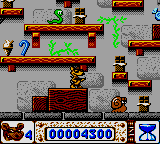
The game places you in a tiny, cluttered environment filled with obstacles, enemies, and hidden pathways. Its colorful pixel art captures a playful yet gritty atmosphere from a mouse’s perspective. Background tunes and sound effects create a lively, slightly frantic mood, emphasizing the urgency of each level. Despite its simplicity, the environments are detailed—scraps of food, tiny tools, makeshift barricades—that make each stage feel like a miniature battleground.
As you move through this small universe, the soundscape heightens the tension, with squeaks, blips, and rhythmic pulses that keep you alert. The straightforward design makes it easy to pick up, but each level demands precise timing and clever puzzle-solving to move forward. This retro aesthetic and atmospheric design foster a sense of small-scale chaos, where every move matters and quick thinking pays off.
How the Gameplay Hooks You
The game blends shooting mechanics with platforming and puzzles, creating a loop that encourages trial-and-error and strategic planning. Levels are short but packed with multiple routes and secrets, rewarding exploration and experimentation. Progress depends on mastering timing, avoiding hazards, and solving environmental puzzles, making each session a mix of reflexes and mental effort. The pace is brisk, with difficulty gradually increasing to keep players interested without feeling overwhelming.
As you complete levels, new challenges pop up—more enemies, complex layouts, or tighter time limits—pushing your skills further. Success feels satisfying, with each cleared level offering a sense of achievement before moving on. The variety and steady progression keep the gameplay fresh, even during longer sessions, while the short levels make it easy to jump in and out for a quick distraction or focused challenge.
Pro Tips for Rats!
Getting familiar with enemy patterns helps—watch their movements and time your shots well.
- Use the environment—hide behind obstacles and lure enemies into traps.
- Timing your shots is key; wait for the right moment and avoid rushing.
- Check every corner for hidden items or shortcuts that might make future levels easier.
- Practice jumping and dodging to improve reaction times against faster enemies.
- Replaying levels can help you learn enemy behavior and find secrets.
Frequently Asked Questions
Can I play Rats! in short sessions without losing progress?
Yes, since levels are self-contained and designed for quick play, you can focus on individual stages without needing to finish the whole game at once.
Is the game suitable for all ages?
The pixel art and non-violent puzzles make it accessible for most players, though younger players might need some help with timing and puzzles.
Does the game get repetitive after a while?
While the core mechanics stay the same, increasing difficulty, new enemy types, and hidden areas help keep things interesting over longer periods.
Rats! offers a tight, nostalgic experience filled with tiny chaos and clever puzzles. Its mix of genres and retro charm makes it a memorable journey—just watch out for those rats!Related games: you can also try Golf Daisuki! (Japan) and Dancing Furby (Japan), or browse all other games in the Game Boy Color category.
How to Play Rats! (USA) (En,Es)?
Move through levels by avoiding hazards, shooting enemies, and solving puzzles to reach the exit. Each level requires quick reflexes and strategic thinking to progress and uncover secrets.
Game Controls
Arrow keys control movement; action buttons are mapped to keyboard keys for shooting and interacting.
Related Retro Games
 ♥ 43Zook Hero Z
 ♥ 1Zok Zok Heroes (Japan)
 ♥ 1Zoids – Shirogane no Juukishin Liger Zero (Japan)
 ♥ 1Zoids – Jashin Fukkatsu! Genobreaker Hen (Japan)
 ♥ 2Zoboomafoo – Playtime in Zobooland (USA)
 ♥ 1Zidane Football Generation (Europe) (En,Fr,De,Es,It)
 ♥ 1Zen-Nihon Shounen Soccer Taikai – Mezase Nihon Ichi! (Japan)
 ♥ 1Zebco Fishing! (USA)