Rayman 2 – The Great Escape (Europe) (En,Fr,De,Es,It)
Play Rayman 2 – The Great Escape (Europe) (En,Fr,De,Es,It)
0 2 2
Rayman 2 – The Great Escape (Europe) (En,Fr,De,Es,It) is a classic Game Boy Color game that brings the charming platforming adventure of the original console release directly to your browser. This game offers a nostalgic look back at the handheld era, capturing the colorful, whimsical world of Rayman with pixel-perfect detail. It’s a small but fun platformer, great for quick sessions or longer playthroughs, all accessible instantly without downloads or emulators.
Read more about Rayman 2 – The Great Escape (Europe) (En,Fr,De,Es,It)Show less
Step Into the World of Rayman 2 – The Great Escape
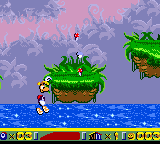
On the Game Boy Color, Rayman 2 keeps its vibrant style, with bright, detailed sprites against simple but expressive backgrounds. The sounds reflect the cheerful melodies of the original, with lively tunes and playful effects that add to the game’s upbeat feel. The atmosphere is lighthearted but full of challenges, giving players a sense of adventure as they explore imaginative worlds and quirky environments.
Even with hardware limitations, the visuals offer enough charm and clarity to keep players engaged. The limited color palette and sprite size create a distinct retro look, with each level full of personality. The sound design complements the visuals, making each stage feel like a lively storybook brought to life on screen.
How the Gameplay Hooks You
This classic platformer has a simple cycle: explore, jump, and solve basic puzzles, all while avoiding enemies and obstacles. The pacing is quick, with each level meant to be finished in just a few minutes, encouraging short tries or longer sessions. Progress takes place across different themed worlds, each with unique challenges and platforming sequences, keeping the sense of discovery ongoing.
The game strikes a good balance between challenge and accessibility. Some parts may need precise timing or puzzle-solving, but overall it’s welcoming for players of all ages. Its design promotes trial and error, rewarding careful observation and quick reflexes, with new mechanics and environments introduced gradually to keep things interesting.
Pro Tips for Rayman 2 – The Great Escape
Getting the most out of this game involves understanding its pacing and platforming controls. Here are some tips:
- Practice your jumps and timing early to avoid repeats in tricky sections.
- Watch for background cues and enemy patterns to plan your moves better.
- Use the pause feature if you get stuck on a tough part to think through your strategy.
- Explore every corner of a level for hidden secrets or shortcuts that can make progress easier.
- Be patient with puzzles; sometimes trying a different approach helps find the solution faster.
- Take breaks when needed—short sessions keep the game fun and prevent frustration.
Frequently Asked Questions
Does Rayman 2 – The Great Escape work well for short gaming sessions?
Yes, levels are designed to be finished quickly, making it perfect for brief play on this browser version.
Is the game suitable for younger children or beginners?
The controls are simple, and the difficulty is forgiving enough for newcomers and younger players, though some platforming precision may take practice for beginners.
Will the game feel repetitive after a while?
While the core gameplay stays consistent, each new level offers fresh themes and challenges, so it doesn’t get dull with repeated tries.
This version of Rayman 2 – The Great Escape offers a compact, approachable platforming experience right in your browser. Its charming visuals, engaging gameplay, and quick levels make it a solid choice for players looking for a nostalgic yet fresh adventure.Related games: you can also try Lucky Luke (USA) (En,Fr,De,Es) and Beatmania GB2 – Gotcha Mix (Japan), or browse all other games in the Game Boy Color category.
How to Play Rayman 2 – The Great Escape (Europe) (En,Fr,De,Es,It)?
Guide Rayman through colorful levels by jumping, exploring, and solving puzzles while avoiding enemies to reach the end of each stage.
Game Controls
Arrow keys control movement; action buttons are mapped to keyboard keys for jumping and interacting.
Related Retro Games
 ♥ 43Zook Hero Z
 ♥ 1Zok Zok Heroes (Japan)
 ♥ 1Zoids – Shirogane no Juukishin Liger Zero (Japan)
 ♥ 1Zoids – Jashin Fukkatsu! Genobreaker Hen (Japan)
 ♥ 2Zoboomafoo – Playtime in Zobooland (USA)
 ♥ 1Zidane Football Generation (Europe) (En,Fr,De,Es,It)
 ♥ 1Zen-Nihon Shounen Soccer Taikai – Mezase Nihon Ichi! (Japan)
 ♥ 1Zebco Fishing! (USA)