Somari 64 Sonic
Play Somari 64 Sonic
0 11 2
Somari 64 Sonic is a quirky, unofficial take on the platforming adventures from the Nintendo 64 era. It combines familiar elements with a playful parody, mixing Sonic’s speed and agility with a unique twist that makes it stand out among retro titles. As a browser-based emulator, it provides easy access to a piece of Nintendo 64 history, inviting players to experience a game that’s both nostalgic and a bit eccentric.
Read more about Somari 64 SonicShow less
Step Into the World of Somari 64 Sonic
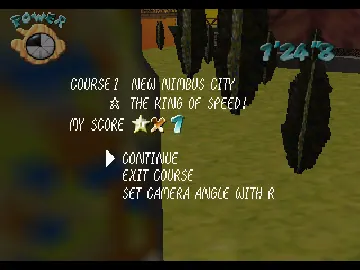
The visuals of Somari 64 Sonic capture the pixelated charm typical of late 90s 3D platformers, with colorful, blocky environments hinting at classic levels filled with loops, platforms, and pixel-perfect obstacles. The soundtrack features energetic tunes that match the game’s fast pace, blending chiptune melodies with a lively atmosphere. The game’s tone leans toward humor, with a quirky design that feels like a lighthearted homage to the Sonic universe, but with its own offbeat character.
Playing on this site means experiencing the game smoothly through your browser, without any need for installation or worrying about compatibility. The emulation stays true to the Nintendo 64’s control feel, so you can jump right into the action. Despite its retro style, the visuals and sound keep a lively, mischievous vibe that makes each run through the levels fun and energetic. The overall mood is playful, with humor woven into the design.
How the Gameplay Hooks You
Somari 64 Sonic offers simple but addictive gameplay centered around fast-paced platforming. The goal is to complete levels quickly while dodging hazards and enemies, which encourages mastering tight jumps and precise timing. The pacing rewards quick reflexes and memorization, making each attempt a test of speed and agility.
The challenge is finding the balance between speed and accuracy. Quick bursts of frantic movement are rewarded, but careful navigation is needed to avoid falling or losing momentum. As you progress, new obstacles and level layouts keep the game interesting without becoming overly complex. Its straightforward design makes for quick sessions that still hold your attention with energetic gameplay and playful obstacles.
Pro Tips for Somari 64 Sonic
Focus on mastering your jumps and speed boosts early on. Precise timing helps avoid setbacks and keeps you moving forward.
- Familiarize yourself with level layouts to find quicker routes and save time.
- Keep an eye out for hidden shortcuts or secret paths that can shave seconds off your run.
- Control your speed carefully to get through tricky sections smoothly.
- Patience is key—don’t rush difficult parts; instead, aim for a steady rhythm.
- Use the environment—bounce off walls or use level features for quick speed boosts.
Frequently Asked Questions
Can I play Somari 64 Sonic in short sessions without losing progress?
Yes, since the game runs directly in your browser, you can start and stop whenever you like without worrying about saving. That makes it perfect for quick gaming sessions.
Does the game get repetitive after a while?
The mechanics and level design are simple, so it might feel repetitive over long playtimes. Still, the increasing difficulty and different level layouts help keep it interesting for shorter bursts.
Is Somari 64 Sonic suitable for all ages?
Yes, its cartoonish visuals and straightforward gameplay make it accessible for players of all ages. Younger players might need some practice with timing, but it’s generally easy to pick up.
Playing Somari 64 Sonic in your browser offers a nostalgic yet fresh experience. Its straightforward mechanics, lively atmosphere, and quick play sessions make it a fun look back at Nintendo 64’s platforming games—all without needing downloads or setups. See how fast you can run through this whimsical, pixelated parody of the Sonic universe.
Related games: you can also try Extreme-G (USA) and Angry Birds Kart 64, or browse all other games in the Nintendo 64 category.
How to Play Somari 64 Sonic?
Run through levels quickly by jumping over obstacles and dodging enemies, using speed and precise timing to finish each stage before time runs out.
Game Controls
Arrow keys control movement; action buttons are mapped to keyboard keys for jumping and running.







