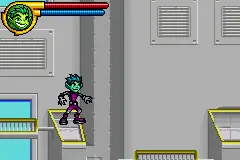
Teen Titans (U)(Trashman)
Play Teen Titans (U)(Trashman)
0 27 3
Teen Titans (U)(Trashman) is a classic Game Boy Advance action game that offers a straightforward but engaging experience rooted in the handheld’s era. As a licensed property with popular superhero characters, it captures the comic book vibe with simple, side-scrolling combat that’s easy to pick up and enjoy. The pixel art and sprite animations evoke the early 2000s GBA style, giving fans a nostalgic touch of that time.
While Teen Titans doesn’t aim for deep complexity, it provides enough to keep players engaged through its quick-paced combat and familiar superhero theme. The visuals are colorful and reasonably detailed for a GBA title, reflecting the energetic spirit of the team. Its soundtrack is minimal but effective, complementing the action without overwhelming. The straightforward design makes it accessible to a wide range of players, whether you’re just looking for some casual fun or want to revisit a piece of handheld history.
Read more about Teen Titans (U)(Trashman)Show less
Why Teen Titans Is Worth Playing
Teen Titans stands out because it focuses on action and quick gameplay loops. It’s a game that tests your timing and reflexes, with enemy patterns that become familiar after a few tries. The sprite design, though limited by the GBA hardware, manages to show off the characters’ personalities with exaggerated expressions and lively movements. The game’s atmosphere captures the youthful, energetic tone of the Teen Titans series, making it appealing whether you’re already a fan or new to the franchise. Despite its simplicity, the game offers a satisfying challenge for those willing to learn its mechanics. It’s perfect for short gaming sessions, giving immediate rewards with each enemy encounter. There’s a certain charm in its no-frills approach, and the pixel art style keeps it grounded in the early 2000s handheld scene. Playing it in your browser makes it quick and easy to jump into, whether for casual play or revisiting a familiar universe without any fuss.Tips to Get Ahead
To get the most out of Teen Titans, a bit of strategy can help. Here are some pointers:- Time your attacks well to avoid damage and hit harder.
- Pay attention to enemy patterns early so you can anticipate their moves and respond better.
- Use special moves or power-ups sparingly—they can turn tough fights around.
- Dodge more than block; quick reflexes tend to work better than waiting for openings.
- Practice levels to memorize enemy spawn points and boost your reaction time.
- If your health gets low, don’t hesitate to restart the level—sometimes patience makes all the difference.
Things to Know Before You Start
Is Teen Titans a difficult game?
It offers a moderate challenge typical of GBA action titles. Some levels require quick reactions, but nothing too punishing for players who stick with it.How long does a session last?
Most levels can be finished in just a few minutes, making it great for quick play sessions or practicing specific parts.Can casual players enjoy Teen Titans?
Yes, thanks to its simple controls and approachable difficulty, it’s suitable for players looking for light, action-packed fun without a steep learning curve.Jump into Teen Titans to relive the classic GBA era with a game that captures the energetic spirit of the teen heroes. Its straightforward action makes it a good pick for fans of retro handheld games or anyone curious about old-school platform combat. Playing in your browser means instant access—no fuss, just pure nostalgic fun with the beloved Teen Titans team.
Related games: you can also try 2 in 1 – Scooby Doo le Film & Scooby Doo 2 Monstres se Dechainment (F)(Independent) and Breath of Fire 2 – Shimei no Ko (J)(Eurasia), or browse all other games in the Game Boy Advance category.
How to Play Teen Titans (U)(Trashman)?
Control Teen Titans to fight enemies, dodge attacks, and defeat bosses by timing your attacks and using power-ups wisely through quick reflexes and pattern recognition.
Game Controls
Arrow keys move characters; attack and action buttons are mapped to keyboard keys.
Related Retro Games
 ♥ 2Zooo (J)(Rising Sun)
 ♥ 4Zooo (E)(Trashman)
 ♥ 2ZooCube (U)(Mode7)
 ♥ 1ZooCube (E)(Blizzard)
 ♥ 1Zone of the Enders – The Fist of Mars (U)(Mode7)
 ♥ 1Zone of the Enders – The Fist of Mars (E)(Cezar)
 ♥ 1Zoku Bokura no Taiyou – Taiyou Shounen Django (J)(Independent)
 ♥ 7Zoku Bokura no Taiyou – Taiyou Shounen Django (J)(Caravan)