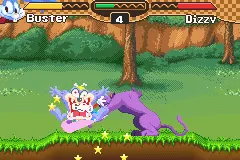
Tiny Toon Adventures – Scary Dreams (U)(Trashman)
Play Tiny Toon Adventures – Scary Dreams (U)(Trashman)
0 11 2
Tiny Toon Adventures – Scary Dreams (U)(Trashman) is a classic Game Boy Advance game that offers a fun, lighthearted take on the platformer genre. If you grew up with the GBA or enjoy nostalgic titles, this game provides a straightforward experience that you can play in your browser without needing to download anything. Its colorful visuals and familiar characters appeal to fans of the franchise and players looking for a casual, retro challenge.
Read more about Tiny Toon Adventures – Scary Dreams (U)(Trashman)Show less
Getting Into Tiny Toon Adventures – Scary Dreams
This game has you guiding the Tiny Toons characters through levels that mix platforming with simple puzzles. The main idea is to run, jump, and avoid obstacles as you move through each stage. The game is divided into different levels or worlds, each with its own setting and challenges. Sessions are usually short, making it easy to jump in for a quick game or settle in for a longer play.
You control a character who needs to reach the end of each level while dodging enemies and pitfalls. The mechanics are simple, focusing on timing and precision rather than complicated combos or RPG-style features. There are no multiplayer options; it’s a single-player game centered on completing levels and trying to get the best score or time. The difficulty gradually increases, encouraging multiple attempts to master each stage.
Standout Features
The visuals are bright and cartoon-inspired, capturing the charm of the Tiny Toons universe with colorful backgrounds and lively character animations. While the graphics are simple, they create a playful mood that appeals to all ages. Recognizing enemy patterns and navigating levels becomes easier after a few tries, thanks to the clear design.
The game follows a straightforward path, with each completed level unlocking the next. It offers enough variety in environments and obstacles to keep things interesting. Many players replay levels to beat previous times or scores, especially since the game is built around short, level-based challenges. This makes it perfect for quick sessions or casual playthroughs.
Strategy and Tips
Getting good at Tiny Toon Adventures – Scary Dreams involves paying attention to timing and enemy movements. Patience helps, especially in tricky sections or when facing enemies.
- Watch how enemies move before rushing into dangerous areas.
- Use jumps carefully to avoid hazards, rather than rushing through levels.
- Explore levels thoroughly for hidden shortcuts or alternative routes.
- Practice tough sections to improve reaction times and build muscle memory.
- Try to complete levels efficiently to boost your score and unlock any bonus content.
Quick Questions
How do I start playing Tiny Toon Adventures – Scary Dreams?
The game runs directly in your browser; just load the page and give it a moment to start. No downloads or setup needed.
What’s a common mistake for beginners?
Many new players rush through levels without paying attention to enemy patterns, which can lead to retries. Take your time to learn each stage’s layout.
Can I play Tiny Toon Adventures – Scary Dreams on mobile or touch devices?
Yes, the game works well on smartphones and tablets through the browser, using touch controls.
Playing Tiny Toon Adventures – Scary Dreams offers a short, entertaining trip back to classic GBA gameplay. Its friendly visuals and simple mechanics make it a good pick for fans of platformers or anyone looking for a relaxed, nostalgic gaming experience.
Related games: you can also try Naruto – Ninja Council (U)(Trashman) and Pac-Man Pinball Advance (U)(TrashMan), or browse all other games in the Game Boy Advance category.
How to Play Tiny Toon Adventures – Scary Dreams (U)(Trashman)?
Guide your character through levels by running and jumping to avoid enemies and obstacles, reaching the end of each stage as quickly as possible. Practice timing and explore for shortcuts to improve your score.
Game Controls
Arrow keys control movement; other keys handle jumping and actions.
Related Retro Games
 ♥ 2Zooo (J)(Rising Sun)
 ♥ 4Zooo (E)(Trashman)
 ♥ 2ZooCube (U)(Mode7)
 ♥ 1ZooCube (E)(Blizzard)
 ♥ 1Zone of the Enders – The Fist of Mars (U)(Mode7)
 ♥ 1Zone of the Enders – The Fist of Mars (E)(Cezar)
 ♥ 1Zoku Bokura no Taiyou – Taiyou Shounen Django (J)(Independent)
 ♥ 7Zoku Bokura no Taiyou – Taiyou Shounen Django (J)(Caravan)