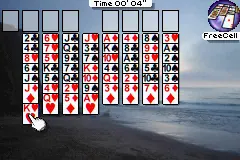
Ultimate Card Games (U)(Independent)
Play Ultimate Card Games (U)(Independent)
0 2 0
Ultimate Card Games (U)(Independent) is a classic Game Boy Advance title that combines several traditional card games into one package. Designed for strategy and card game enthusiasts, it offers a straightforward experience that can be enjoyed casually or with more competitive goals. Since it runs directly in your browser, it’s perfect for players who want a quick, nostalgic game on any device without downloads or installations.
Read more about Ultimate Card Games (U)(Independent)Show less
Getting Into Ultimate Card Games
The core of the game involves choosing from a selection of popular card games, which may include classics like Poker, Rummy, Solitaire, or other familiar variants. When you start a session, you pick a game mode, and the game immediately shows you the rules and your initial hand or setup. Matches are usually turn-based, requiring you to make decisions based on your cards and the current state of play. You can play against AI or, in some cases, with others online.
Playing a typical session means evaluating your hand, planning your moves, and reacting to your opponent’s plays if applicable. The game focuses on decision-making rather than quick reflexes, making it accessible for players of all ages. Each game ends when a victory condition is met, such as depleting your opponent’s chips or forming a winning hand. Your progress is saved between sessions, so you can practice and improve over time.
Standout Features
Ultimate Card Games features clean, simple visuals that evoke a nostalgic feel of early 2000s handheld gaming. The interface is clear, showing your cards, opponent moves, and game status, which helps keep the focus on strategy rather than flashy animations. The game includes multiple modes, offering variety for players who want to try different rules or challenges within the same package. Its replay value comes from the variety of card games included and the challenge of mastering each one, especially as the AI adapts to your skill level or offers different difficulty settings.
Progress in Ultimate Card Games is mostly about sharpening your strategic thinking and building winning streaks. Since several games are available, you can switch between them to keep things fresh. The design encourages trying out different strategies, making it suitable for casual players looking for quick fun and for those more invested in refining their techniques. The browser-based emulation means you can play anytime without managing files or complicated setups.
Strategy and Tips
To get the most out of Ultimate Card Games, it’s helpful to understand the rules of each game and play to your strengths. Here are some tips:
- Watch carefully what cards your opponent plays to pick up clues about their hand or strategy.
- In games like Poker or Rummy, managing your risk and knowing when to fold or hold can turn the tide in your favor.
- Practice opening moves to see what tends to work well early in each game.
- Adjust your strategy based on the difficulty of the AI; tougher opponents often require more cautious or unpredictable tactics.
- Take your time during each turn to consider all options; rushing can lead to mistakes.
- Try different card games to develop a broader strategic perspective and keep gameplay engaging.
Quick Questions
How do I start a new game in Ultimate Card Games?
Just select the card game mode from the main menu, and a new match will begin automatically.
What’s a common mistake beginners make?
Many players rush their moves without thinking through the consequences, which can cost them wins.
Can I play this on my mobile or touchscreen device?
Yes, since the game runs in your browser, it works well on touchscreens with no extra setup needed.
Ultimate Card Games offers a straightforward collection of classic card games that are easy to learn but hard to master. Its focus on strategy and replay value makes it a good choice for fans of traditional card play, all accessible for free in your browser for quick fun whenever you want.
Related games: you can also try Nicktoons Racing (E)(Patience) and Pokemon Scale x Fang (Demo v1.0.1), or browse all other games in the Game Boy Advance category.
How to Play Ultimate Card Games (U)(Independent)?
Choose a card game, follow the rules, and try to win by making the best moves or depleting your opponent’s chips. Take turns, decide wisely, and aim for victory or high scores.
Game Controls
Arrow keys navigate; Enter confirms selections; other keys handle game actions.
Related Retro Games
 ♥ 2Zooo (J)(Rising Sun)
 ♥ 4Zooo (E)(Trashman)
 ♥ 2ZooCube (U)(Mode7)
 ♥ 1ZooCube (E)(Blizzard)
 ♥ 1Zone of the Enders – The Fist of Mars (U)(Mode7)
 ♥ 1Zone of the Enders – The Fist of Mars (E)(Cezar)
 ♥ 1Zoku Bokura no Taiyou – Taiyou Shounen Django (J)(Independent)
 ♥ 7Zoku Bokura no Taiyou – Taiyou Shounen Django (J)(Caravan)