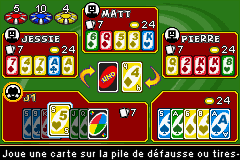
Uno 52 (E)(sUppLeX)
Play Uno 52 (E)(sUppLeX)
0 2 0
Uno 52 (E)(sUppLeX) is a classic Game Boy Advance title that turns the familiar card game into a digital challenge. Its straightforward setup captures the essence of the physical game, offering quick sessions that keep your mind busy without a steep learning curve. As a relic from the GBA era, it’s perfect for players looking for a simple multiplayer card game that runs right in your browser, with no downloads or installations needed.
Read more about Uno 52 (E)(sUppLeX)Show less
Step Into the World of Uno 52
The game looks much like a real deck, with colorful, uncomplicated visuals that remind you of the classic card game. The interface is clean, featuring large cards and clear indicators that make gameplay easy to pick up, even if you’re new. The sound design is minimal but effective, with subtle clicks and beeps that mimic drawing and playing cards. The vibe is relaxed and light, meant for quick, friendly matches rather than deep strategy or storytelling.
Playing directly in your browser, Uno 52 gives a nostalgic feeling for fans of the original game. It’s easy to access and ready to go whenever you want. The interface adjusts well to different screen sizes, making it convenient for short breaks or waiting times. The experience stays true to the traditional game, with no flashy animations or busy backgrounds—just pure Uno-style gameplay in a simple digital format.
How the Gameplay Hooks You
The game keeps you engaged with familiar turn-based mechanics and the simple joy of outsmarting your opponents. Matches move quickly, with players making decisions about which card to play, when to challenge, or when to hold back. The pace makes it perfect for quick sessions.
Strategy comes from timing and managing your hand. Knowing when to play certain cards or save special ones can add some depth, even with straightforward rules. The AI offers a fair challenge, and if multiplayer options are available, you can play against friends or random opponents, which keeps things fresh over multiple rounds.
Pro Tips for Uno 52
Pay attention to the colors and numbers your opponents are discarding to predict their moves.
- Keep a balanced hand—avoiding too many of the same color or type helps you stay flexible.
- Use special cards wisely; holding onto them can turn the game in your favor at key moments.
- Watch for patterns in how your opponents play to get a sense of what they might do next.
- Don’t rush to play your last card; think about whether it’s worth forcing a draw or challenging an opponent.
- Practice making quick decisions to improve your speed and overall gameplay.
Frequently Asked Questions
Can I play Uno 52 in multiplayer mode on this site?
The game is mainly designed for single-player against AI. Some versions might support local multiplayer if available. Check the options for multiplayer or pass-and-play features.
Does Uno 52 get repetitive after a while?
The game stays interesting through fast rounds and the unpredictability of AI or opponents’ choices. Short sessions also help keep things fresh without feeling repetitive.
Is Uno 52 good for quick or longer play sessions?
Its quick match setup makes it great for brief play, but you can also play multiple rounds if you want. The gameplay naturally favors short, strategic bursts rather than long sessions.
Playing Uno 52 offers a simple, nostalgic take on the classic card game right in your browser. Its mechanics are easy to pick up, and the relaxed vibe makes it a good choice for anyone looking for quick strategy fun without fuss.
Related games: you can also try F-Zero (J)(Independent) and Pocket Professor – Kwik Notes Vol. 1 (U)(Independent), or browse all other games in the Game Boy Advance category.
How to Play Uno 52 (E)(sUppLeX)?
Match cards by matching colors or numbers, and use special cards to disrupt opponents. The goal is to be the first to run out of cards in your hand.
Game Controls
Arrow keys move; Enter or space to select and play cards.
Related Retro Games
 ♥ 2Zooo (J)(Rising Sun)
 ♥ 4Zooo (E)(Trashman)
 ♥ 2ZooCube (U)(Mode7)
 ♥ 1ZooCube (E)(Blizzard)
 ♥ 1Zone of the Enders – The Fist of Mars (U)(Mode7)
 ♥ 1Zone of the Enders – The Fist of Mars (E)(Cezar)
 ♥ 1Zoku Bokura no Taiyou – Taiyou Shounen Django (J)(Independent)
 ♥ 7Zoku Bokura no Taiyou – Taiyou Shounen Django (J)(Caravan)