Virtual Chess 64 (USA) (En,Fr,Es)
Play Virtual Chess 64 (USA) (En,Fr,Es)
0 1 0
Virtual Chess 64 (USA) (En,Fr,Es) is a classic Nintendo 64 game emulated in your browser, offering a straightforward digital chess experience rooted in the Nintendo 64 era. Fans of chess who want a simple, accessible way to play against computer opponents or friends will find this game familiar and easy to pick up. Its design reflects the early 3D style typical of N64 titles, making it a nostalgic choice for players who enjoyed the console’s library of classic board and strategy games.
Read more about Virtual Chess 64 (USA) (En,Fr,Es)Show less
Getting Into Virtual Chess 64
The game centers on traditional chess gameplay, with players taking turns moving pieces on the board. You can choose to play against the computer, which offers various difficulty levels, or challenge a friend locally if you have a second controller connected. The interface is minimal, emphasizing the chessboard and standard controls, making it accessible for players of all experience levels. Matches typically start with a standard opening setup, and the game proceeds with each player planning their moves carefully, aiming for checkmate.
Session lengths vary based on the game mode and skill level. Casual players might finish a game in 10-20 minutes, while more experienced players could spend longer analyzing positions. The game also allows for undo moves and different difficulty settings, making it suitable for quick practice or longer, more strategic matches. Since it’s an emulated browser version, you can jump into a game instantly without any setup, which makes it perfect for quick chess breaks or light competition.
Standout Features
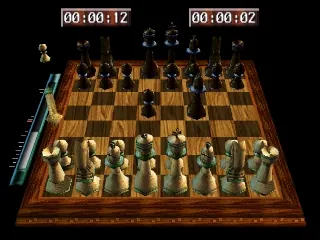
Visuals in Virtual Chess 64 stay true to the Nintendo 64’s polygonal style, giving a blocky, nostalgic look to the chess pieces and board. While not highly detailed, the design is clear enough to distinguish all pieces easily, helping keep gameplay smooth and intuitive. The interface focuses on clarity over flashy effects, allowing players to concentrate on strategic decisions without distraction.
Replay value comes from multiple difficulty levels, the ability to play against friends locally, and the simplicity of chess itself. Since the game follows standard rules with no complex mechanics, it’s easy to pick up and put down. Its straightforward design makes it a good choice for quick matches and practicing tactics, especially for beginners or players returning to chess after some time. The absence of extra modes keeps the focus on core gameplay, but that’s enough to keep chess fans coming back.
Strategy and Tips
Starting with a solid opening helps gain early control of the board. Focus on controlling the center and developing your pieces early on. Keep your king safe, especially when castling.
- Always check for threats before making a move—avoid leaving pieces hanging or exposed.
- Use pawns to control key squares and create pawn chains for a strong defense.
- Practice recognizing common tactical motifs like forks, pins, and skewers to improve your attack and defense.
- Think a few moves ahead instead of reacting only to your opponent’s last move.
- Adjust difficulty settings if the game feels too easy or too hard to stay engaged.
Quick Questions
How do I start a new game?
Simply select the option to play against the computer or another player, and the game will set up a new chessboard automatically.
What’s a common mistake beginners make?
Many overlook king safety and forget to castle early, leaving their king vulnerable to attacks.
Can I play this on a mobile device or touchscreen?
Since it runs directly in your browser, it works on mobile browsers with touch support, though the controls are designed for mouse and keyboard typical of N64 games.
Virtual chess 64 offers a straightforward, nostalgic way to enjoy chess online. Its classic design and familiar gameplay make it a reliable choice for players seeking a simple chess experience directly in their browser.
Related games: you can also try Hamster Monogatari 64 (Japan) and Forsaken 64 (USA), or browse all other games in the Nintendo 64 category.
How to Play Virtual Chess 64 (USA) (En,Fr,Es)?
Move your pieces to capture the opponent’s king and checkmate. Take turns, plan your moves carefully, and use different difficulty levels or challenge a friend locally for fun matches.
Game Controls
Arrow keys or mouse to select and move pieces; confirm with Enter or click.







