Virtual Pool 64 (Europe)
Play Virtual Pool 64 (Europe)
0 1 0
Virtual Pool 64 (Europe) is a classic Nintendo 64 game that captures the feel of billiards on a console from the late ’90s. Great for pool fans and casual players, this version offers realistic physics and simple gameplay that bring the pool hall right into your browser. Whether you’re remembering the Nintendo 64 days or trying out a vintage title for the first time, this emulation makes it easy to enjoy virtual billiards without downloads or complicated setup.
Read more about Virtual Pool 64 (Europe)Show less
Getting Into Virtual Pool 64
The main gameplay in Virtual Pool 64 focuses on realistic billiard simulation. You can choose different game modes, like straight pool, eight-ball, or nine-ball, each with its own challenge and strategy. The controls are designed to mimic real cue sports, requiring precise aiming, power adjustment, and cue ball striking. Usually, you pick a game mode and table style, then line up your shot with a simple aiming system before hitting with a click or button press.
Matches happen turn-by-turn, with each player or AI opponent taking their shot. The game rewards accuracy and good positioning, especially in multi-ball games. You can practice specific shots or jump straight into a match, making it suitable for quick play or longer sessions that focus on strategy. Realistic ball physics respond naturally to your strikes, encouraging careful aim and thoughtful play.
Standout Features
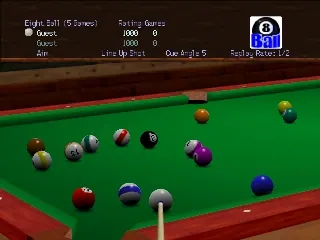
Visually, Virtual Pool 64 keeps a clean, functional look typical of late ’90s sports titles. The tables are detailed enough to see cloth colors and ball markings, but the focus remains on gameplay rather than flashy graphics. The physics engine provides convincing ball movement and collision responses, adding to the realism. While it’s not high-definition, the straightforward graphics suit the gameplay well, especially in a browser environment.
You can select different game modes and difficulty levels, with the AI adjusting its skills accordingly. The variety of modes and skill settings encourage repeated play, keeping each session fresh. Mastering shot placement and cue ball control is key to improving, which keeps the game engaging. As a Nintendo 64 classic, it offers enough depth to keep coming back, whether for practice or casual competition against AI or friends.
Strategy and Tips
Getting the most out of Virtual Pool 64 means understanding how to control shots and position the cue ball well. Visualize your shot’s path before making it, especially in tricky spots.
- Think ahead about your next shot and position the cue ball to set up easier follow-up shots.
- Fine-tune your aim if you want to add spin or control the cue ball’s movement after contact.
- Try different shot types, like cut shots and banks, to expand your skills for more advanced play.
- Pay attention to how the physics respond — balls move naturally, so use that to judge how much force to apply.
- In multiplayer or practice modes, experiment with various difficulty levels to steadily improve your precision and tactics.
Quick Questions
How do I start a game in Virtual Pool 64?
Pick your game mode and table, then aim and hit using the on-screen controls. It’s designed for instant play right in your browser.
What’s a common mistake beginners make?
Many overhit or misjudge angles, which can lead to missed shots or poor positioning. Focus on controlling the power and aiming carefully.
Can I play Virtual Pool 64 on mobile or touch devices?
Yes, since the game runs in your browser, it works on mobile devices with touch controls, so you can play anywhere.
Virtual Pool 64 offers a straightforward, physics-based billiards experience that’s easy to pick up and often hard to put down. Its browser version makes it simple to enjoy this classic from the Nintendo 64 era without any fuss.Related games: you can also try Banjo-Kazooie Worlds Collide and Shotgun Mario 64, or browse all other games in the Nintendo 64 category.
How to Play Virtual Pool 64 (Europe)?
Aim and hit the cue ball to pocket all the balls in a set, following the rules of your chosen game mode. Take turns with an AI or friend, adjusting aim and power for precise shots.
Game Controls
Use keyboard to aim, adjust power, and strike; specific keys emulate the console controller functions.







