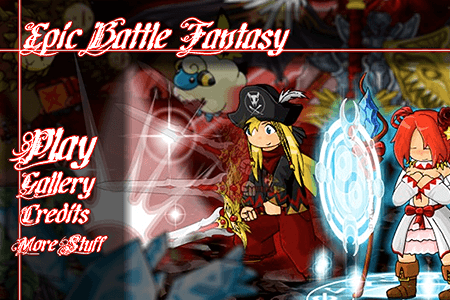
Epic Battle Fantasy
Play Epic Battle Fantasy
0 50 50
Epic Battle Fantasy is a colorful browser game filled with humor that combines the feel of classic turn-based RPGs with modern flash gameplay. It’s perfect for players who enjoy strategic battles, quirky characters, and a touch of nostalgia. The game offers a lively adventure packed with battles, exploration, and surprises—no downloads or installations needed, just play right in your browser.
If you’re into pixel art, witty dialogue, and tough encounters, Epic Battle Fantasy is likely to keep you entertained. Its simple gameplay makes it easy for newcomers to pick up, but there’s enough depth to keep seasoned players interested. You can jump into fights, customize your party, and explore a whimsical world full of monsters, treasures, and secrets—all wrapped in a retro-inspired look that nods to the golden days of browser games.
Read more about Epic Battle FantasyShow less
Getting Into Epic Battle Fantasy
Playing Epic Battle Fantasy involves turn-based combat where you plan your moves carefully and make quick decisions. You’ll explore different environments, fight enemies, and gather loot to upgrade your characters. The main idea is to choose the right actions—attack, defend, or use special skills—to win fights efficiently. As you go, tougher enemies and boss battles will test your resource management and tactical skills.
Most sessions follow a pattern: exploring a map or level, encountering enemies, then fighting in a combat screen. Between battles, you can visit shops, upgrade gear, or find hidden items that boost your stats. The game encourages trying different strategies and character setups, so each run can feel fresh. It supports multiple difficulty levels, so you can pick a casual mode or a more challenging one depending on your mood.
Standout Features
The pixel art style gives the game a nostalgic yet fresh look. Bright sprites, animated attacks, and funny character designs add personality and keep things lively. The soundtrack complements the visuals well, making the experience enjoyable and reminiscent of classic game tunes.
Progression feels rewarding as you beat enemies and earn experience points and loot. You can level up your characters and unlock new abilities, customizing your team to match your preferred playstyle. The game also offers plenty of replay value with different character classes, hidden secrets, and optional challenges. Its mix of simple mechanics with layered upgrades means there’s always something new to try and master, keeping the game interesting over time.
Strategy and Tips
Getting the most out of Epic Battle Fantasy means understanding your characters’ strengths and weaknesses against enemies. Planning your moves helps turn tough battles in your favor. Here are some tips:
- Prioritize upgrading your characters early, balancing attack power with health and defense to stay alive longer.
- Use special skills wisely—save them for bosses or hard enemies rather than wasting them on weaker foes.
- Watch enemy weaknesses; some enemies are vulnerable to specific attack types, making fights easier.
- Keep an eye on your inventory—potions, buffs, and gear can make a big difference in tough battles.
- Explore every part of the map; hidden items and secret paths can give you an edge.
- Adjust your tactics depending on the difficulty—what works in easy mode might need tweaking on harder settings.
- Try different character setups and team configurations to find what works best for you.
Quick Questions
Is Epic Battle Fantasy suitable for new players?
Yes. Its mechanics are straightforward, and you can choose difficulty levels. Some boss fights can challenge you, but patience and planning help a lot.
How long does a typical playthrough last?
It depends on how much you explore and your pace. Usually, a full run takes a few hours, and replayability along with different difficulty options can extend that.
Can I play Epic Battle Fantasy on my phone or tablet?
Since it’s a browser-based flash game, it works well on devices with modern browsers and touch support. Just ensure your browser is up to date. It’s playable on both desktop and mobile without much trouble.
With its humor, strategy, and retro charm, Epic Battle Fantasy stands out among free browser games. Its engaging gameplay, vibrant visuals, and focus on upgrades make it a game you might find yourself returning to. Whether you want to beat tough bosses or just enjoy some pixel-perfect battles, this game delivers a casual, fun experience that mixes classic flash gaming with a modern touch.
Related games: you can also try Awesome Tanks 2 and Pimp’s Quest, or browse all other games in the Flash category.
How to Play Epic Battle Fantasy?
Choose actions like attack, defend, or use skills to defeat enemies in turn-based battles while exploring environments and upgrading your characters.
Game Controls
Use mouse to select options and click, or keyboard keys for navigation and actions.